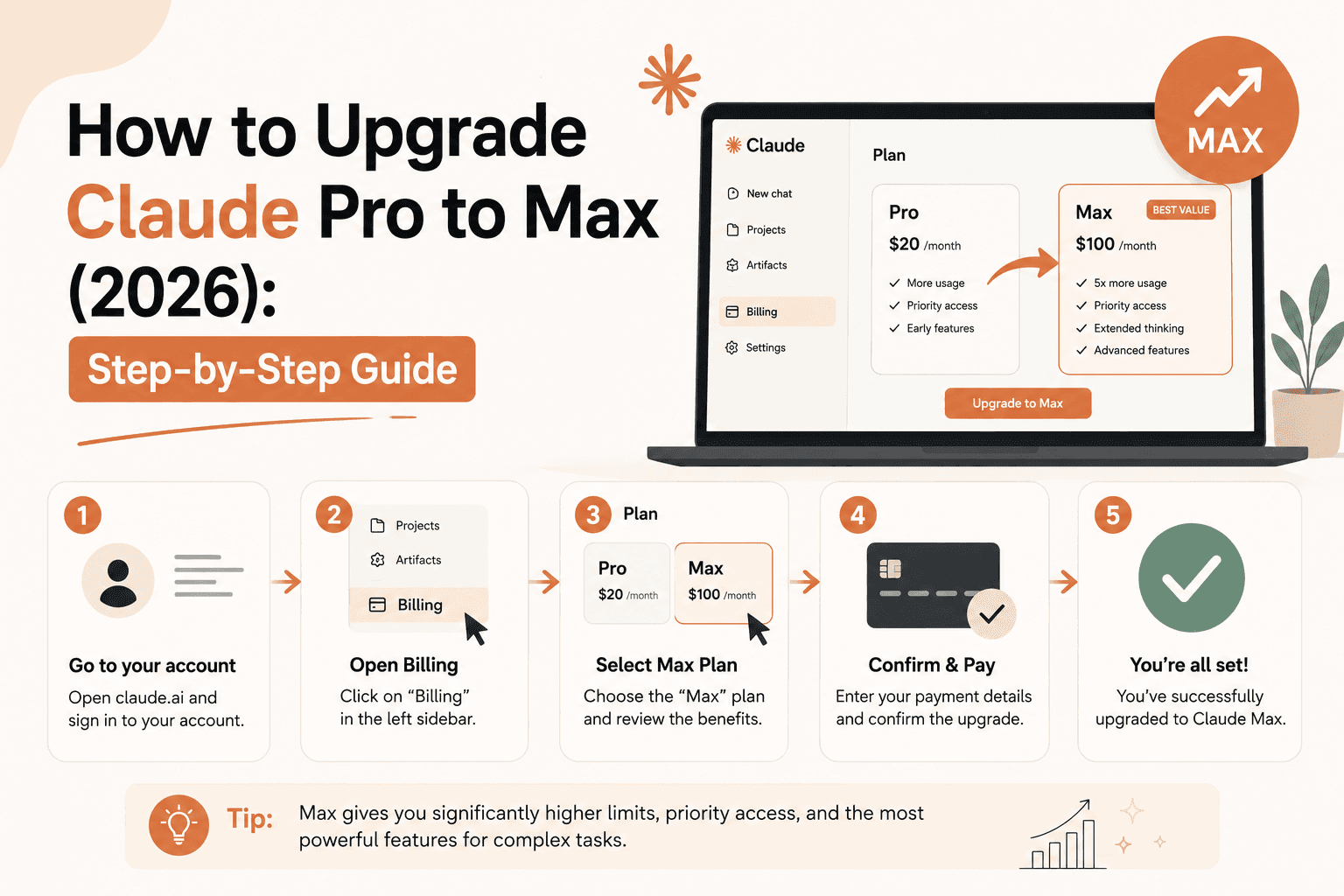
How to Upgrade Claude Pro to Max (2026): Step-by-Step Guide
How to upgrade from Claude Pro to Max, what happens to your billing (including annual Pro plans), and whether you can switch without losing money. Official steps.
How to Upgrade Claude Pro to Max (2026): Step-by-Step, Including Annual Plans
You can upgrade from Claude Pro to Max directly, in about 60 seconds, without canceling anything first: go to Settings > Billing, select "Upgrade to Max," choose your tier (5x or 20x), and confirm. The upgrade takes effect immediately, and Anthropic prorates the cost so you're not paying twice for the same days. If you're on an annual Pro plan specifically, there's one detail worth knowing before you click confirm: if your remaining annual balance is worth more than a month of Max, the difference is stored as credit toward future billing rather than refunded — covered in detail below.
How to upgrade from Claude Pro to Max (step-by-step)
This is the official process, direct from Anthropic's support documentation:
- Log in to your Claude account at claude.ai
- Go to Settings > Billing
- Select "Upgrade to Max"
- Choose your usage tier — 5x ($100/month) or 20x ($200/month)
- Confirm your upgrade
That's the entire process. Your Pro plan converts to Max immediately — there's no waiting period, no separate cancellation step, and no risk of losing access in between. For the full breakdown of what actually changes once you're upgraded (usage limits, Opus access in Claude Code, priority queueing), see our Claude Pro vs Max comparison.
One additional access difference worth knowing before you upgrade: Fable, Anthropic's Mythos-tier model, is also gated differently by plan. Pro includes only limited Fable usage credits, while both Max 5x and Max 20x unlock access up to 50% of your weekly usage limit — a meaningful jump if Fable is part of why you're considering the upgrade in the first place, not just Opus or raw volume.
What happens to your billing when you upgrade
If you're on a monthly Pro plan, the upgrade is prorated for the remainder of your current billing cycle — you're charged the difference between what you'd already paid for the rest of the month on Pro and the equivalent cost on Max, not the full new price on top of what you already paid.
If you're on Team, this same "unused time gets credited" logic applies when switching billing frequency too — Anthropic states plainly that "upgrades take effect right away, and any unused time on your current plan is credited toward the new one, so you won't pay twice for the same days." The same principle governs the Pro-to-Max upgrade.
Upgrading from an annual Pro plan specifically
This is the detail most comparison articles skip, and it's exactly what the "claude pro annual upgrade to max" search is really asking about. Here's the situation: Max plans are currently month-to-month only — there's no annual Max option. So what happens to the value left on your annual Pro subscription when you upgrade to a monthly Max plan?
Per Anthropic's official support documentation: if the remaining balance on your annual Pro plan is greater than your new Max plan's price, you receive a credit to your account for the difference — not a refund to your card, but a credit automatically applied to future subscription charges. In practice, this usually means your first several months of Max are covered by the leftover value of your annual Pro plan before you see a new charge.
One condition to know about: to receive this credit, the billing address on your Max subscription must match the billing address on your previous Pro subscription. If your billing address has changed, Anthropic's documented workaround is to cancel your Pro subscription, wait until its official end date, and then sign up for Max fresh with your new billing address — the direct in-account upgrade path specifically requires matching addresses to carry the credit over.
Can you upgrade, or do you have to cancel and resubscribe?
You can upgrade directly — this is worth stating clearly because it's a common point of confusion. You do not need to cancel your Pro plan and wait for it to end before subscribing to Max. The "Upgrade to Max" button inside Settings > Billing handles the transition in one step, with your remaining Pro value carried forward as described above.
The cancel-and-resubscribe route is only necessary in one specific case: if your billing address has changed since you subscribed to Pro (see the annual-plan section above), or if you're trying to move a subscription between payment platforms — for example, from a direct claude.ai subscription to one managed through Google Play, which Anthropic treats as a completely separate billing relationship.
5x or 20x — which to pick when upgrading
Anthropic doesn't let you "try" one tier and switch instantly without cost — but switching between Max 5x and Max 20x later is also prorated, so it's not a locked-in, all-or-nothing decision. If you're upgrading specifically because you're hitting Pro's limits with Claude Code, Max 5x is generally the better starting point for most individual developers; Max 20x is built for the heaviest, most sustained daily usage. We cover the practical difference — including a detail most people miss about Opus access inside Claude Code specifically — in Claude Pro vs Max.
If you subscribed through the App Store or Google Play
This is a genuine exception to everything above. If you originally subscribed to Pro through Google Play (or Apple's App Store), the upgrade doesn't work the same prorated-credit way. Instead, you're charged the full price of the new Max plan immediately, and the unused value of your old Pro subscription is converted into extra days added to your new Max subscription — meaning your next renewal date lands a few days later than a standard full month, rather than your first invoice being discounted. You still keep the value of your remaining time either way; it just shows up as extra days instead of a smaller bill.
What happens to your chats, projects, and files
Nothing changes. Per Anthropic's own pricing documentation, your chats, projects, and files stay with your account regardless of which plan you're on — upgrading (or later downgrading) doesn't touch your conversation history or saved work in any way.
Switching back from Max to Pro
If you decide Max isn't worth it after upgrading, downgrades work differently from upgrades: they take effect at the end of your current billing period, not immediately. You'll keep Max access (and its higher usage limits) until that period ends, then your account reverts to Pro on your next renewal date. There's no partial refund for downgrading mid-cycle — you simply use what you already paid for through the end of the period.
FAQ
How do I upgrade from Claude Pro to Max? Go to Settings > Billing, select "Upgrade to Max," choose your tier (5x or 20x), and confirm. It takes effect immediately, with billing prorated for the rest of your current cycle.
Can you upgrade Claude Pro to Max directly, or do you need to cancel first? You can upgrade directly, in one step, without canceling your Pro subscription first. Canceling and resubscribing is only necessary if your billing address has changed or you're switching between payment platforms (e.g., direct billing to Google Play).
What happens if I upgrade from an annual Pro plan to Max? Since Max is currently month-to-month only, any remaining value on your annual Pro plan that exceeds your first month of Max is converted into account credit, automatically applied to future billing — not refunded to your card.
Do I lose my billing address discount or need to re-enter payment info? You need your Max subscription's billing address to match your previous Pro subscription's billing address to receive the credit from an annual plan. If it's changed, cancel Pro, wait for the end date, then resubscribe to Max with the new address.
Will I lose my chat history when I upgrade to Max? No. Your chats, projects, and files remain with your account regardless of which plan — Pro, Max, or otherwise — you're on.
How long does the upgrade take to go into effect? Immediately. There's no waiting period between confirming the upgrade and getting Max-level access and limits.
What if I subscribed to Claude Pro through the App Store or Google Play? The upgrade process is different: you're charged the full Max price right away, and your remaining Pro value is added as extra days on the new subscription instead of appearing as a prorated discount.
Can I switch from Max back to Pro if I change my mind? Yes, but downgrades take effect at the end of your current billing period rather than immediately — you keep Max access until then, with no partial refund for the unused portion.
Do Pro and Max give the same access to every model? No. Opus access inside Claude Code specifically requires Max (Pro only unlocks it in the web chat), and Fable — Anthropic's Mythos-tier model — is similarly limited on Pro to usage credits only, while Max 5x and Max 20x both unlock Fable access up to 50% of your weekly usage limit.
Conclusion
Upgrading from Claude Pro to Max is a genuinely simple, one-step process — Settings > Billing > Upgrade to Max — and Anthropic prorates the cost so you're not paying for the same days twice. The one situation worth planning for specifically is upgrading off an annual Pro plan: since Max doesn't offer annual billing, any leftover value converts to account credit rather than a refund, which is worth knowing before you click confirm so a "free" first few months of Max doesn't come as a surprise. Outside of that case — and the separate App Store/Google Play billing path — there's no reason to overthink the upgrade itself; the harder decision is whether 5x or 20x actually fits how you use Claude, which is what our Claude Pro vs Max comparison is built to help with.
Related
Resources
Claude Pro vs Max: Which Plan Actually Pays for Itself in 2026?

Best AI Video Generator in 2026: 15 Tools Compared (Free & Paid)
Sora Alternatives: What to Use Now That It's Gone (2026)

Free AI Video Generator (2026): What You Actually Get for $0