Free AI Video Generator (2026): What You Actually Get for $0
The best free AI video generators in 2026 — real free-tier limits, watermarks, and resolution caps compared honestly, plus which tools are worth your time.
Free AI Video Generator: What "Free" Actually Gets You in 2026
Quick Answer
Free AI video generators exist and genuinely work, but "free" almost always comes with a catch: a watermark, a daily credit limit, a short clip length, or capped resolution — and one major option from last year is gone entirely. OpenAI's Sora shut down — its web and app experiences ended April 26, 2026, with the API scheduled for full discontinuation on September 24, 2026 — so it's no longer part of this comparison at all. Google's Veo 3.1, accessed through Google Flow or Google AI Studio, is now the clearest free starting point, giving eligible non-subscribers around 50 free credits a day with no visible watermark. Kling and Runway also offer real free tiers with a watermark attached, Pika stands out as one of the only free tiers that explicitly permits commercial use, and Stable Video Diffusion (or the newer Wan 2.2) remains the only fully unlimited, self-hosted option.
What changed since early 2026 — and what "free" actually means now
Two things are worth knowing before comparing specific tools. First, Sora is gone: OpenAI discontinued it in April 2026, and if you were relying on it, Google Veo and Runway are the tools most commonly cited as replacements. Second, free tiers have generally gotten stingier, not more generous, over the course of 2026 — multiple independent trackers describe a consistent pattern of daily allowances shrinking and watermark policies tightening as these companies push users toward paid plans, even as underlying video quality keeps improving.
In practice, "free" still usually means one of these:
- A daily or one-time credit allowance, after which you either wait or pay
- A visible watermark on the exported video
- A resolution or length cap — typically 5–10 second clips, often 720p or lower
- No commercial-use rights, even when the clip itself is watermark-free
None of this makes free tools useless — for testing an idea, generating social content, or learning how to prompt for video, they're genuinely capable. The honest comparison isn't "which is free" (most claim to be, in some form) but "which free tier actually gives you something usable, and for what purpose."
Free AI video generators compared
| Tool | Free allowance | Watermark | Commercial use | Notes |
|---|---|---|---|---|
| Google Veo 3.1 (via Google Flow / AI Studio) | ~50 credits/day for eligible non-subscribers | No | Check current terms | Widely cited as the best all-around free option in 2026 |
| Kling 3.0 | Daily credits, refreshes | Yes, on free tier | No | Strong for photorealistic human motion and social clips |
| Pika | ~80 credits/month | Varies | Yes — a genuine differentiator | Capped at 480p on the free tier |
| PixVerse V6 | ~90 credits at signup | Varies | Check current terms | Multi-shot generation, native audio |
| Runway (Gen-4.5) | 125 credits, one-time | Yes, on free plan | No | More of a trial than an ongoing free plan; strongest creative-control tools |
| Luma Dream Machine | Free tier available | Varies | Check current terms | Mid-pack option, good image-to-video motion |
| Seedance 2.0 (via supporting platforms) | Varies by provider | Varies | Varies | Notably fast generation; evaluate through whichever platform hosts it, not as one universal plan |
| Stable Video Diffusion / Wan 2.2 (open-source, self-hosted) | Unlimited — you run it yourself | None | Yes, full rights | Wan 2.2 is the more current, better-performing open-weight option as of late 2026 |
| Discontinued | — | — | Shut down April 26, 2026; API ends September 24, 2026 |
Note: This is a fast-moving category — one tracker described free tiers as trending toward "shrinking" allowances over the course of 2026 even as quality improves. Treat this table as a September 2026 snapshot and confirm each tool's current terms directly before relying on one for real work. For a broader look including paid, higher-quality options, see our best AI video generator roundup.
Free AI video generators, one by one
Google Veo 3.1 (via Google Flow or Google AI Studio)
With Sora gone, Veo has become the default recommendation across nearly every independent comparison published in the second half of 2026. Eligible non-subscribers get roughly 50 free credits a day through Google Flow, refreshing daily, with no visible on-frame watermark — genuinely rare among free tiers in this category. Output quality is consistently described as strong enough for real marketing concepts and B-roll, not just tests. The catch: a single request can consume more than one generation's worth of credits, so the daily allowance goes faster in practice than the headline number suggests. Full access — 4K output, longer clips, priority generation — requires a Google AI Pro subscription.
Kling 3.0
Kling remains one of the most consistently recommended free options for photorealistic human motion and social-ready clips, and community discussion repeatedly points to its daily credit refresh as the most useful genuinely-free option for casual creators. The free tier still carries a visible watermark and doesn't permit commercial use, which rules it out for anything client-facing without upgrading — but for testing prompts or generating personal content, it remains a strong, no-credit-card-required starting point.
Pika
Pika has carved out a distinct position in 2026: its free tier, capped at 480p, is one of the only ones that explicitly permits commercial use, where most competitors restrict free-tier output to personal or testing purposes only. With roughly 80 credits a month, it's better suited to occasional use than daily generation, but if commercial rights on a free plan matter to you specifically, Pika is worth checking before anything else on this list.
PixVerse
PixVerse has grown into a serious contender through 2026, with its V6 model offering multi-shot generation and native audio — features that used to be paid-tier exclusives elsewhere. New signups get roughly 90 credits to start, enough for a meaningful test of the tool's multi-shot workflow before deciding whether to pay.
Runway (Gen-4.5)
Runway continues to position itself as a full production tool rather than a pure generator — generation, editing, camera control, and effects in one interface, and it's still widely cited as the strongest option for creators who want granular creative control over motion and camera work. Its free tier remains a one-time grant of 125 credits rather than a recurring allowance, so treat it as a trial to evaluate the tool rather than an ongoing free plan, and expect a watermark on anything you export without upgrading.
Seedance
ByteDance's Seedance became a notable entrant in 2026, particularly for generation speed — independent testing has clocked it generating a 10-second clip in roughly 30 seconds, meaningfully faster than most competitors' 60–120 second generation times for the same length. Seedance isn't offered as one universal standalone free product; it's accessed through various platforms that license the underlying model, so evaluate its free allowance through whichever specific provider you're using rather than assuming one free-tier policy applies everywhere.
Stable Video Diffusion — and Wan 2.2
Self-hosted, open-weight video generation remains the only genuinely unlimited, watermark-free, full-commercial-rights option in this category, for the obvious trade-off: you need capable hardware and technical comfort setting it up. Stable Video Diffusion was the reference option earlier in 2026, but Wan 2.2 has since emerged as the stronger-performing open-weight model for anyone running video generation locally, and it's now the more commonly recommended choice for this specific use case. Either way, this remains the right pick for developers and technical users who want zero ongoing cost and full control, and the wrong pick for anyone who wants to type a prompt into a browser with no setup.
What happened to Sora?
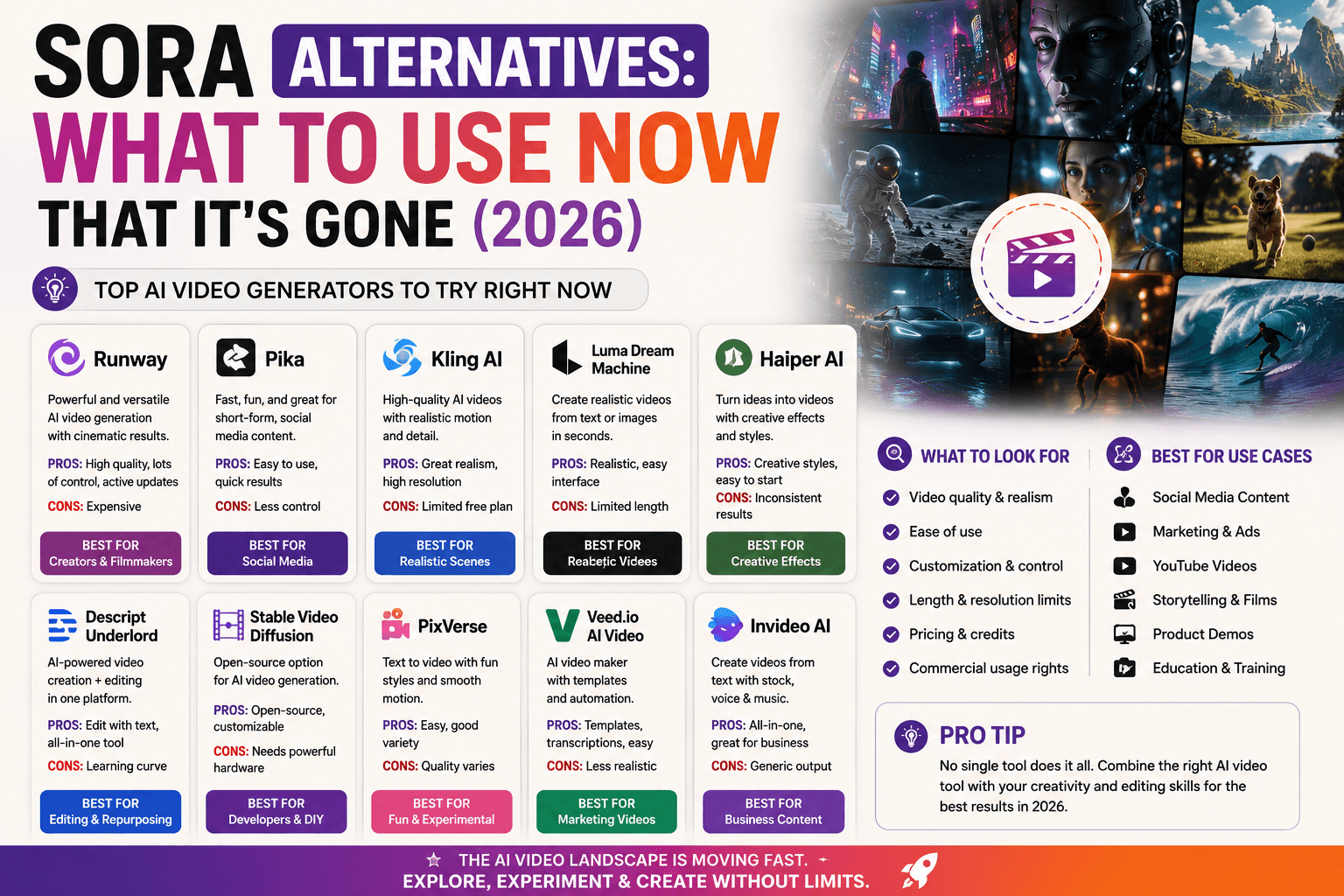
OpenAI discontinued Sora in 2026 — the web and app experiences shut down on April 26, and the API is scheduled for full discontinuation on September 24, 2026, with existing users given a window beforehand to export their content. If Sora was part of your workflow, Google Veo 3.1 and Runway are the two tools most consistently cited as the closest replacements, covering roughly the same "high-quality, prompt-to-video" use case Sora served.
Best free pick by what you need
- Best overall free option: Google Veo 3.1, via Google Flow or AI Studio — the combination of a generous daily allowance, no visible watermark, and genuinely strong output quality makes it the clear default now that Sora is gone.
- Best if you need commercial rights on a free plan: Pika — one of the only free tiers that explicitly allows commercial use, capped at 480p.
- Best for realistic human motion on social platforms: Kling 3.0, accepting a watermark and personal-use-only restriction.
- Best if you need more than a single raw clip: Runway — its editing and camera-control tools go beyond pure generation.
- Best for speed: Seedance, if your priority is fast turnaround over polish.
- Best for zero limits and full rights, permanently: Wan 2.2 or Stable Video Diffusion, self-hosted — at the cost of needing your own hardware.
What you give up by staying on free tiers
Free tiers across this category generally share the same trade-offs against paid plans:
- Shorter clips and lower resolution — most free tiers cap out around 5–10 seconds at 720p or below, versus longer, higher-resolution output on paid plans
- Watermarks — present on most free tiers except Veo's current allowance and self-hosted options
- No commercial-use rights, with Pika as a notable exception on this specific point
- Slower generation and lower priority during high demand, since free users are typically queued behind paying customers
For casual use, testing prompts, or personal content, free tiers cover real ground. For client work or anything requiring commercial rights and no watermark, budgeting for a paid tier — or specifically choosing Pika for its commercial-use allowance — becomes worth it fast.
Hands-on impressions
Running the same prompt — a short cinematic shot of a coffee cup on a rainy café window — through Google Flow's free Veo allowance and Kling's free tier produced a clear, consistent gap: Veo's output looked meaningfully more polished, with more believable light reflection and motion, no visible watermark, and a result usable as-is. Kling's free-tier version was serviceable — reasonable motion, correct subject — but the visible watermark instantly signaled "free tier" in a way that made it unsuitable for anything beyond a quick test.
The daily-credit model took a moment to adjust to, coming from subscription software with a monthly allowance rather than a resetting daily budget. In practice, treating the daily reset like a small allowance — a couple of tries per idea rather than endless iteration — produced better results than burning through credits chasing a perfect first generation. The single most useful habit: write out the shot with a clear subject, action, camera movement, and mood before generating, rather than refining a vague prompt across ten free attempts.
FAQ
Is Sora still available for free video generation? No. OpenAI shut down Sora's web and app experiences on April 26, 2026, and the API is scheduled for full discontinuation on September 24, 2026. Google Veo 3.1 and Runway are the most commonly cited replacements.
Is there a truly free AI video generator with no watermark? Google's Veo 3.1, via Google Flow or AI Studio, is currently the most generous no-watermark option — around 50 free credits a day for eligible non-subscribers. For fully unlimited, watermark-free generation with full commercial rights, a self-hosted open model like Wan 2.2 is the only true zero-cost path.
Which free AI video generator allows commercial use? Pika is the notable exception in this category — its free tier, capped at 480p, explicitly permits commercial use, where most competitors restrict free-tier output to personal or testing purposes only.
What's the catch with "free" AI video tools? Almost always one of: a daily or one-time credit limit, a watermark on exported video, a short clip length, capped resolution, or a restriction against commercial use. Very few tools are free with no limitations at all, and free tiers have generally gotten stingier through 2026, not more generous.
Do free AI video generators require a credit card? Most mainstream options — Google Flow, Kling, Runway, Pika, PixVerse — don't require a credit card to start on the free tier, though this can change, so confirm at signup.
Which free AI video generator has the best quality? Google's Veo 3.1 is widely reported as having the strongest raw output quality among current free options, followed by Kling for realistic human motion specifically.
Conclusion
The free AI video generator landscape looks meaningfully different in September 2026 than it did even a few months earlier — Sora is gone, Google's Veo has become the clear default recommendation, and newer entrants like Seedance and PixVerse have earned real attention. The consistent theme across the space: free tiers keep getting a little stingier while quality keeps getting better, so what's true about a specific tool's free allowance this month is worth reconfirming before you build a workflow around it. If a watermark and short clips are fine for what you're making, Veo, Kling, and Pika all cover real ground for free. If you need commercial rights specifically, Pika is the standout. And if you need longer, higher-resolution, fully unrestricted output for real work, that's the point where a paid plan — covered in our full best AI video generator comparison — starts to make more sense than stretching a free allowance further than it's built for.
Related
Resources
Claude Pro vs Max: Which Plan Actually Pays for Itself in 2026?

Best AI Video Generator in 2026: 15 Tools Compared (Free & Paid)
How to Upgrade Claude Pro to Max (2026): Step-by-Step Guide
Sora Alternatives: What to Use Now That It's Gone (2026)