MCP Architecture Explained: Hosts, Clients, Servers & Data Flow
MCP architecture explained from the host and client layers to servers, tools, resources, prompts, transports, and JSON-RPC data flow, including the latest 2026-07-28 stateless architecture.
MCP Architecture Explained: Hosts, Clients, Servers, and Data Flow
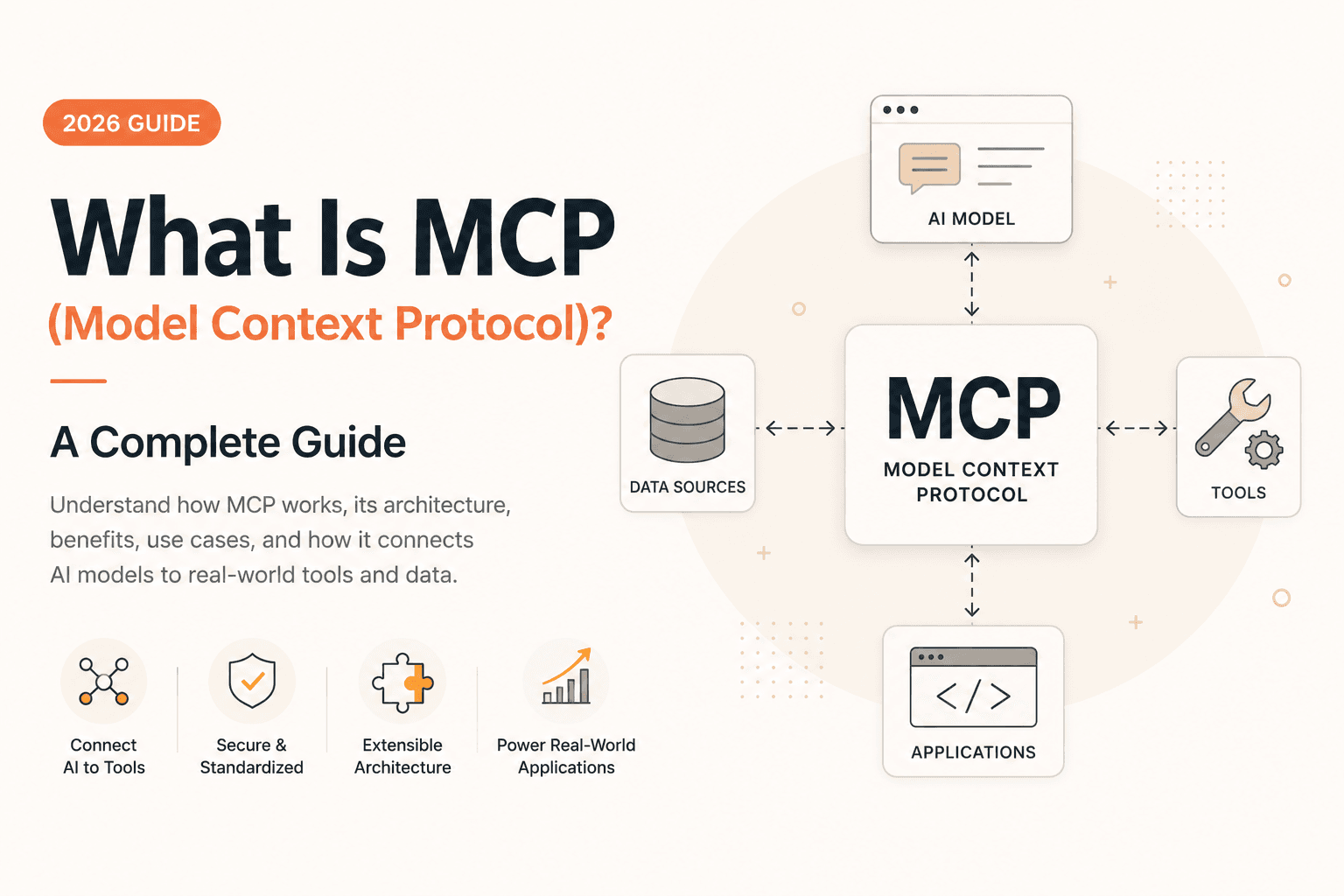
The Model Context Protocol (MCP) is an open protocol for connecting AI applications with external tools, data, and capabilities through a standardized interface. Understanding MCP architecture is essential if you are building AI agents, MCP servers, AI-powered IDEs, or applications that need reliable access to external systems.
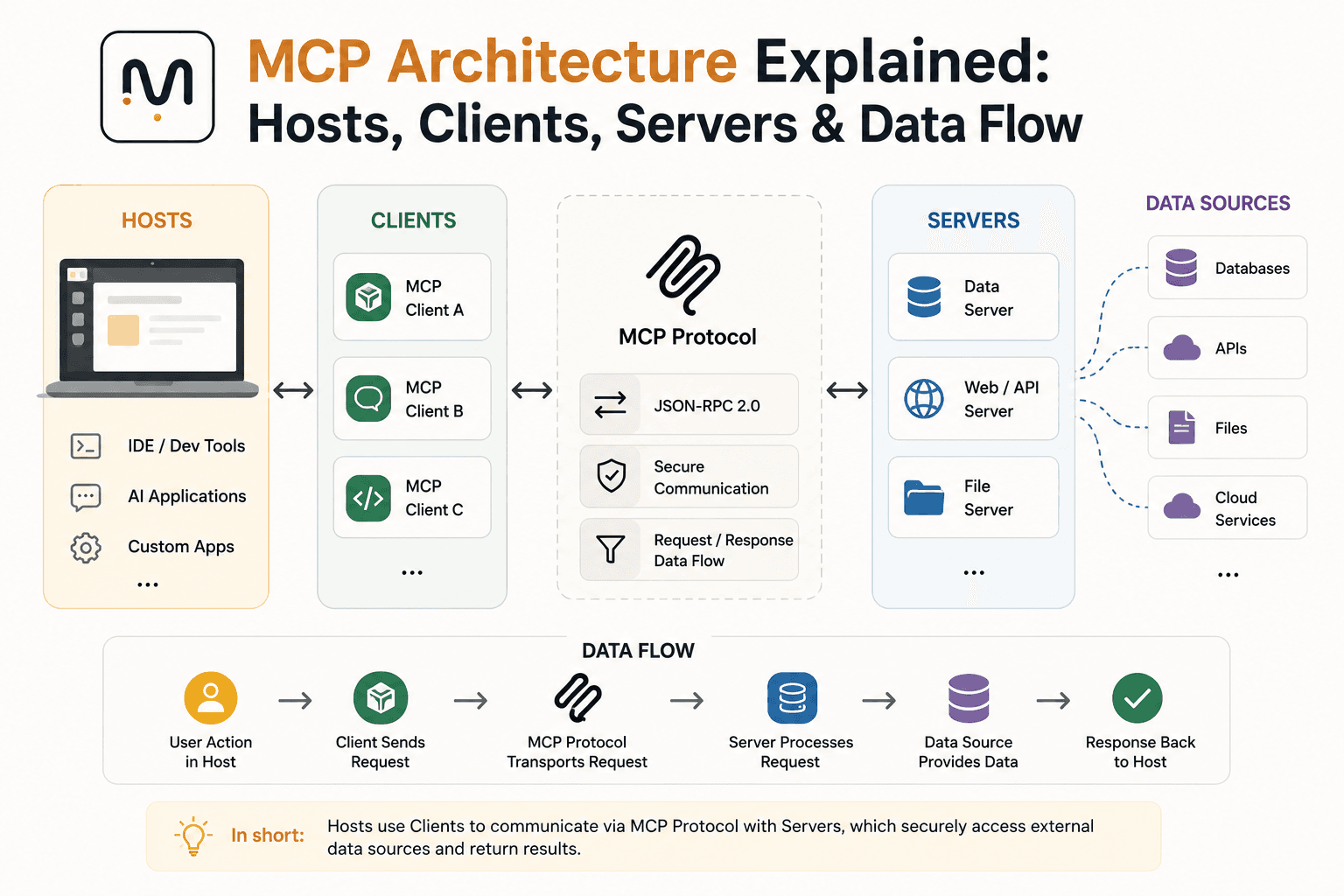
At a high level, MCP separates the AI application from the systems it needs to access. An MCP host is the application the user interacts with, an MCP client acts as the connector inside that host, and an MCP server exposes tools, resources, and other capabilities.
The architecture is intentionally modular. Instead of building a custom integration between every AI application and every external service, developers can implement an MCP server once and allow compatible hosts to connect to it.
For a broader introduction before diving into the architecture, see What Is MCP?.
Quick answer: MCP architecture consists of an AI application host, one or more MCP clients, and MCP servers that expose capabilities such as tools, resources, and prompts. Communication uses JSON-RPC, while transports such as stdio and Streamable HTTP carry the messages. The current 2026-07-28 specification uses a stateless protocol core, making remote MCP deployments easier to scale horizontally.
MCP Architecture at a Glance
The easiest way to understand MCP is to start with the relationship between its main components.
┌─────────────────────────────────────────────────────┐
│                    MCP HOST                         │
│                                                     │
│   AI Application / IDE / Agent / Assistant          │
│                                                     │
│   ┌────────────────┐      ┌────────────────┐        │
│   │   MCP Client   │      │   MCP Client   │        │
│   │       #1       │      │       #2       │        │
│   └───────┬────────┘      └───────┬────────┘        │
└───────────┼───────────────────────┼─────────────────┘
            │                       │
            │ MCP                   │ MCP
            │                       │
            ▼                       ▼
┌────────────────────┐    ┌────────────────────┐
│    MCP Server      │    │    MCP Server      │
│                    │    │                    │
│  Tools             │    │  Tools             │
│  Resources         │    │  Resources         │
│  Prompts           │    │  Prompts           │
└─────────┬──────────┘    └─────────┬──────────┘
          │                         │
          ▼                         ▼
   ┌──────────────┐          ┌──────────────┐
   │ APIs / DBs   │          │ Files / SaaS │
   │ Services     │          │ Internal Data│
   └──────────────┘          └──────────────┘
The important distinction is that the host, client, and server are not interchangeable terms.
The host is the application containing the AI experience. The client is the protocol connector inside that application. The server is the component that provides access to external capabilities.
What Are the Main Components of MCP Architecture?
MCP architecture can be understood through six major concepts:
- MCP host
- MCP client
- MCP server
- MCP primitives
- Transport layer
- JSON-RPC communication
Each layer has a different responsibility.
1. MCP Host
The MCP host is the application that the user interacts with.
Examples can include:
- AI assistants
- AI-powered IDEs
- Coding agents
- Desktop AI applications
- Enterprise AI applications
- Custom LLM applications
The host is responsible for coordinating the overall AI experience.
For example, imagine an AI coding application that allows a developer to ask:
"Find the open authentication issues in our GitHub repository and summarize them."
The AI application itself is the host.
The host may have several MCP clients connected to different servers:
AI Coding Application
│
├── MCP Client
│   └── GitHub MCP Server
│
├── MCP Client
│   └── PostgreSQL MCP Server
│
└── MCP Client
    └── Filesystem MCP Server
The host therefore becomes the orchestration boundary between the model, the user, and MCP connections.
This distinction becomes particularly important when an AI application connects to multiple MCP servers simultaneously.
2. MCP Client
An MCP client is the protocol component inside the host that communicates with an MCP server.
A single host can contain multiple MCP clients.
For example:
                 MCP Host
                    │
       ┌────────────┼────────────┐
       │            │            │
       ▼            ▼            ▼
   Client A      Client B      Client C
       │            │            │
       ▼            ▼            ▼
    GitHub        Slack       Database
    Server        Server        Server
Each client manages communication with an MCP server.
The client is responsible for sending MCP requests and handling responses according to the protocol. It also provides a boundary between the host application and the remote or local MCP server.
This architecture allows the host to treat different external integrations through a consistent protocol rather than implementing a completely different integration mechanism for every service.
3. MCP Server
An MCP server is a program that exposes capabilities to an MCP client.
Despite the name, an MCP server does not necessarily have to be a large remote server.
It can be:
- A local process
- A command-line program
- A service running on another machine
- A container
- A cloud-hosted API
- An internal enterprise service
The server provides standardized MCP capabilities while hiding the implementation details of the underlying system.
For example:
MCP Server
│
├── Tool: search_issues
├── Tool: create_issue
├── Tool: update_issue
│
├── Resource: repository://README
├── Resource: repository://schema
│
└── Prompt: summarize_issue
The underlying implementation might use GitHub's REST API, a database driver, a filesystem, or an internal microservice.
The AI application does not need to know how those operations are implemented.
MCP Server Architecture
A practical MCP server can be viewed as an adapter layer:
                MCP Client
                    │
                    │ MCP
                    ▼
          ┌─────────────────────┐
          │     MCP Server      │
          │                     │
          │  Protocol Layer     │
          │         │           │
          │         ▼           │
          │  Tool / Resource    │
          │  Implementation     │
          │         │           │
          └─────────┼───────────┘
                    │
        ┌───────────┼───────────┐
        ▼           ▼           ▼
      REST API     DB        Filesystem
This separation is one of the most useful properties of MCP.
The MCP layer standardizes the interface, while the implementation remains free to use whatever technology the underlying system requires.
MCP Tools, Resources, and Prompts
MCP servers can expose different types of capabilities.
The three most important server-side primitives are:
- Tools
- Resources
- Prompts
The distinction between them is important because they represent different kinds of interaction.
MCP Tools
Tools represent executable operations.
A tool might:
- Query a database
- Call an external API
- Search a repository
- Create a ticket
- Run a calculation
- Modify a file
- Trigger an internal workflow
For example:
search_users(query)
create_ticket(title, description)
get_order(order_id)
A tool generally has a name, description, and input schema.
The AI model can discover available tools and determine which one is appropriate for a task.
Tools allow language models to interact with external systems, but because they can trigger real-world actions, implementations should apply appropriate user consent and security controls.
MCP Resources
Resources represent data or contextual information.
Examples include:
- Files
- Database schemas
- Documentation
- Configuration
- Repository information
- API specifications
- Application data
A resource is identified through a URI.
For example:
file:///project/README.md
postgres://database/schema
github://repository/issues
Resources are conceptually closer to readable context than executable actions.
The distinction can be simplified as:
Resource → "Give the model information."

Tool     → "Let the model perform an operation."

Prompt   → "Give the user/model a reusable interaction template."
Resources provide contextual data while allowing the host application to decide how that context should be incorporated into the AI experience.
MCP Prompts
Prompts are reusable prompt templates or workflows exposed by an MCP server.
For example:
review_pull_request(repository, pull_request)
could generate a standardized code-review workflow.
Prompts are useful when a domain-specific interaction should be packaged and reused rather than recreated manually by the user.
A server might therefore expose:
Prompts
├── review_code
├── summarize_document
├── analyze_incident
└── generate_release_notes
This makes MCP more than simply an API wrapper. The server can expose structured capabilities that help the host create a richer AI workflow.
How MCP Communication Works
At the protocol level, MCP uses JSON-RPC 2.0 to represent requests, responses, notifications, and errors.
A simplified request looks like:
{
  "jsonrpc": "2.0",
  "id": 1,
  "method": "tools/call",
  "params": {
    "name": "search_issues",
    "arguments": {
      "query": "authentication"
    }
  }
}
The MCP server processes the request and returns a JSON-RPC response.
Conceptually:
Client
  │
  │ tools/call
  │
  ▼
MCP Server
  │
  │ execute search_issues()
  │
  ▼
GitHub API
  │
  ▼
MCP Server
  │
  │ JSON-RPC response
  ▼
Client
The protocol therefore separates what operation is being requested from how the underlying operation is implemented.
MCP Transport Layer
JSON-RPC defines the message format, but the messages still need a way to travel between the client and server.
This is the job of the transport layer.
Common MCP transports include:
stdio- Streamable HTTP
Streamable HTTP is the modern HTTP transport for remote MCP deployments.
stdio Transport
The stdio transport is commonly used when the MCP client launches the server locally.
The architecture looks like:
MCP Host
   │
   ▼
MCP Client
   │
   │ spawn process
   ▼
MCP Server
   │
   ├── stdin  ← JSON-RPC messages
   └── stdout → JSON-RPC messages
This model is particularly useful for local developer tools.
For example, an AI coding application can launch:
node my-mcp-server.js
The client communicates with that process through standard input and output.
The server does not need to expose a public HTTP endpoint.
Streamable HTTP
For remote deployments, MCP can use Streamable HTTP.
The architecture becomes:
AI Application
      │
      ▼
   MCP Client
      │
      │ HTTP
      ▼
┌──────────────────┐
│ Load Balancer    │
└────────┬─────────┘
         │
    ┌────┴────┐
    ▼         ▼
MCP Server  MCP Server
    │         │
    └────┬────┘
         ▼
    External APIs
This is especially important for production deployments.
The current MCP specification uses a stateless protocol core, allowing requests to be handled independently and making horizontal scaling behind ordinary load balancers significantly simpler.
MCP's Stateless Architecture
One of the most important architectural changes in modern MCP is the move toward a stateless protocol core.
Older MCP versions used a lifecycle based around initialization, capability negotiation, and protocol-level sessions.
The current architecture changes that model.
The protocol core is stateless:
                 Request 1
Client ─────────────────────────► Server A

                 Request 2
Client ─────────────────────────► Server B

                 Request 3
Client ─────────────────────────► Server C
The requests do not have to remain pinned to the same server instance.
This is a major architectural improvement for cloud infrastructure.
A production MCP service can more naturally use:
- Load balancing
- Horizontal scaling
- Serverless infrastructure
- Container orchestration
- Autoscaling
- Standard HTTP gateways
without requiring protocol-level sticky sessions.
Capability Discovery
MCP capabilities determine what a client or server can support.
Server capabilities can include features such as:
Server
├── tools
├── resources
├── prompts
└── logging
Client-side capabilities can include features such as:
Client
├── roots
├── sampling
├── elicitation
└── extensions
Modern MCP implementations can use capability discovery when a client needs to understand what a server supports.
This distinction matters when reading older MCP tutorials because protocol lifecycle behavior has evolved over time.
MCP Data Flow: A Real Example
Consider an AI coding assistant connected to a GitHub MCP server.
The user asks:
"Find all open authentication issues and summarize the highest-priority ones."
The flow might look like this:
1. User
   │
   │ natural language request
   ▼
2. AI Host
   │
   │ determines required capability
   ▼
3. MCP Client
   │
   │ tools/call
   ▼
4. GitHub MCP Server
   │
   │ call GitHub API
   ▼
5. GitHub
   │
   │ issue data
   ▼
6. MCP Server
   │
   │ structured result
   ▼
7. MCP Client
   │
   │ result returned to host
   ▼
8. AI Model
   │
   │ analyze and summarize
   ▼
9. User
The important point is that MCP does not replace the AI model.
Instead, it creates a standardized bridge between the AI application and external capabilities.
MCP Architecture vs Traditional API Integration
Without MCP, an AI application might implement integrations like this:
AI Application
│
├── GitHub Integration
├── Slack Integration
├── PostgreSQL Integration
├── Notion Integration
├── Jira Integration
└── Filesystem Integration
Every integration has its own:
- Authentication
- API client
- Schema
- Error handling
- Tool definitions
- Context formatting
With MCP:
AI Application
      │
      ├── MCP Client → GitHub MCP Server
      ├── MCP Client → Slack MCP Server
      ├── MCP Client → PostgreSQL MCP Server
      └── MCP Client → Jira MCP Server
The host can interact with each integration through the same protocol model.
This does not mean MCP eliminates APIs.
Instead:
MCP sits above existing APIs and systems as a standardized AI integration layer.
An MCP server may internally call REST APIs, GraphQL APIs, databases, SDKs, or local services.
MCP Architecture and AI Agents
MCP becomes particularly useful when combined with AI agents.
An AI agent typically needs three things:
Agent
│
├── Reasoning
├── Context
└── Actions
MCP helps provide the last two.
For example:
AI Agent
   │
   ├── MCP Server A
   │      ├── Resources
   │      └── Tools
   │
   ├── MCP Server B
   │      ├── Resources
   │      └── Tools
   │
   └── MCP Server C
          ├── Resources
          └── Tools
The agent can obtain information from resources and perform actions through tools.
This makes MCP particularly relevant to agentic applications because the protocol provides a standardized capability layer without requiring every agent framework to implement every external integration independently.
MCP Security Architecture
The more powerful an MCP server becomes, the more important security becomes.
A server exposing read-only documentation is very different from a server exposing:
delete_file()
execute_command()
create_payment()
update_database()
send_email()
Tools can represent real actions and potentially arbitrary code execution paths.
A production architecture should therefore look more like:
                    AI Host
                       │
                       ▼
                  MCP Client
                       │
                 Authentication
                       │
                       ▼
                API Gateway / WAF
                       │
                Authorization
                       │
                       ▼
                  MCP Server
                       │
             ┌─────────┼─────────┐
             ▼         ▼         ▼
           APIs        DB      Services
Security should not be treated as an optional layer added after the MCP server is finished.
Important production controls include:
- Authentication
- Authorization
- Tool permissions
- Input validation
- Output validation
- Rate limiting
- Secret management
- Audit logging
- Monitoring
- Network isolation
MCP Architecture for Production
A local MCP server can be extremely simple.
A production MCP platform is considerably more complex.
A scalable architecture may include:
                         Users
                           │
                           ▼
                    AI Applications
                           │
                           ▼
                       MCP Clients
                           │
                           ▼
                    API Gateway / WAF
                           │
                 ┌─────────┴─────────┐
                 │                   │
                 ▼                   ▼
           MCP Server A        MCP Server B
                 │                   │
          ┌──────┼──────┐      ┌──────┼──────┐
          ▼      ▼      ▼      ▼      ▼      ▼
         API     DB    Cache  SaaS   API    DB
Important production concerns include:
- Authentication
- Authorization
- Tool permissions
- Rate limiting
- Input validation
- Output validation
- Logging
- Observability
- Tracing
- Caching
- Horizontal scaling
- Failure handling
- Secret management
For large-scale deployments, the stateless protocol model is particularly useful because standard infrastructure such as load balancers and autoscaling groups can distribute requests without requiring protocol-level session affinity.
MCP Extensions and the Future of the Architecture
MCP is no longer limited to its original core primitives.
The ecosystem now includes an extensions framework for adding capabilities without changing the base protocol for every use case.
Examples include:
- MCP Apps
- Tasks
- Enterprise authorization
- Domain-specific extensions
MCP Apps, for example, extend MCP so tools can be associated with UI resources that hosts can render in a sandboxed environment.
Tasks address long-running operations by allowing a client to work with task handles and retrieve progress or results separately from the original request.
This suggests that MCP architecture is evolving from a simple:
AI → Tool
model into a broader:
AI Application
      │
      ▼
   MCP Layer
      │
 ┌────┼──────────────┐
 ▼    ▼              ▼
Tools Resources    Prompts
 │      │             │
 └──────┼─────────────┘
        ▼
    Extensions
        │
   ┌────┴─────┐
   ▼          ▼
 MCP Apps    Tasks
The protocol therefore has room to support richer agentic workflows without forcing every feature into the core specification.
Common MCP Architecture Mistakes
Confusing the Host and Client
The host is the application.
The client is the MCP connector inside that application.
They are related but not the same component.
Treating MCP as an API Replacement
MCP does not replace REST, GraphQL, database protocols, or SDKs.
It provides an AI-oriented protocol layer on top of existing systems.
Treating Every MCP Server as a Remote Cloud Service
MCP servers can run locally through stdio or remotely through Streamable HTTP.
The deployment model depends on the use case.
Assuming Old MCP Tutorials Describe the Current Protocol
This is especially important in 2026.
MCP has evolved quickly, and older tutorials may describe lifecycle, transport, or session behavior that differs from the current specification.
When implementing a new MCP server, always verify the specification revision supported by your SDK.
MCP Architecture vs Traditional Agent Integration
The architectural difference can be summarized like this:
| Approach | Integration Model | Scalability | Reusability |
|---|---|---|---|
| Direct API integration | Custom integration per application | Medium | Low |
| Function calling | Model-specific tool definitions | Medium | Medium |
| MCP | Standardized client/server protocol | High | High |
| MCP + AI agents | Standardized tools, resources, and agent workflows | High | Very high |
MCP is valuable because it separates the AI application from the implementation of external capabilities.
That separation is one of the main reasons MCP can work across different AI applications and developer tools.
Why MCP Architecture Matters
Understanding MCP architecture is more useful than memorizing individual MCP commands.
Once you understand the architecture, you can reason about:
- Where an MCP server should run
- How an AI application connects to it
- Where authentication belongs
- How tools differ from resources
- How data flows through the system
- How local and remote MCP deployments differ
- How to scale an MCP service
- How MCP fits into AI agent architectures
- Where security boundaries should exist
The fundamental model remains simple:
             AI APPLICATION
                   │
                   ▼
              MCP CLIENT
                   │
             MCP PROTOCOL
                   │
                   ▼
              MCP SERVER
                   │
          ┌────────┼────────┐
          ▼        ▼        ▼
        TOOLS   RESOURCES  PROMPTS
          │        │        │
          └────────┼────────┘
                   ▼
          EXTERNAL SYSTEMS
The complexity comes from what you build around this core: authentication, authorization, transport, observability, scaling, agent orchestration, and domain-specific capabilities.
Final Takeaway
MCP architecture is a standardized bridge between AI applications and external capabilities.
The host provides the AI experience, MCP clients establish the protocol connection, and MCP servers expose tools, resources, prompts, and other capabilities. JSON-RPC provides the message model, while transports such as stdio and Streamable HTTP determine how those messages move between the client and server.
The most important architectural concept to understand in 2026 is the stateless MCP protocol core. This architecture allows MCP services to fit more naturally into modern HTTP infrastructure, load-balanced deployments, and horizontally scalable systems.
For developers building AI agents, the resulting architecture is particularly powerful:
                    AI AGENT
                       │
                 ┌─────┴─────┐
                 │            │
              Context       Actions
                 │            │
                 └─────┬──────┘
                       │
                    MCP
                       │
        ┌──────────────┼──────────────┐
        ▼              ▼              ▼
   MCP Server      MCP Server      MCP Server
      GitHub          Database        Files
        │              │              │
        ▼              ▼              ▼
      APIs             Data          Tools
That is the architectural idea behind MCP: standardize how AI applications discover and use external context and capabilities without forcing every AI application to build every integration from scratch.
If you are new to MCP, start with What Is MCP?, then use this architecture guide as a reference for understanding how hosts, clients, servers, tools, resources, transports, and agents fit together.
Related
Resources
What Is MCP (Model Context Protocol)? A Complete Guide (2026)

OpenRouter API Tutorial: How to Connect & Fetch LLM Responses (JS/Node.js)
The Best AI Tools for Developers in 2026
Why Is Next.js Fast Locally but Slow on Vercel + Supabase?