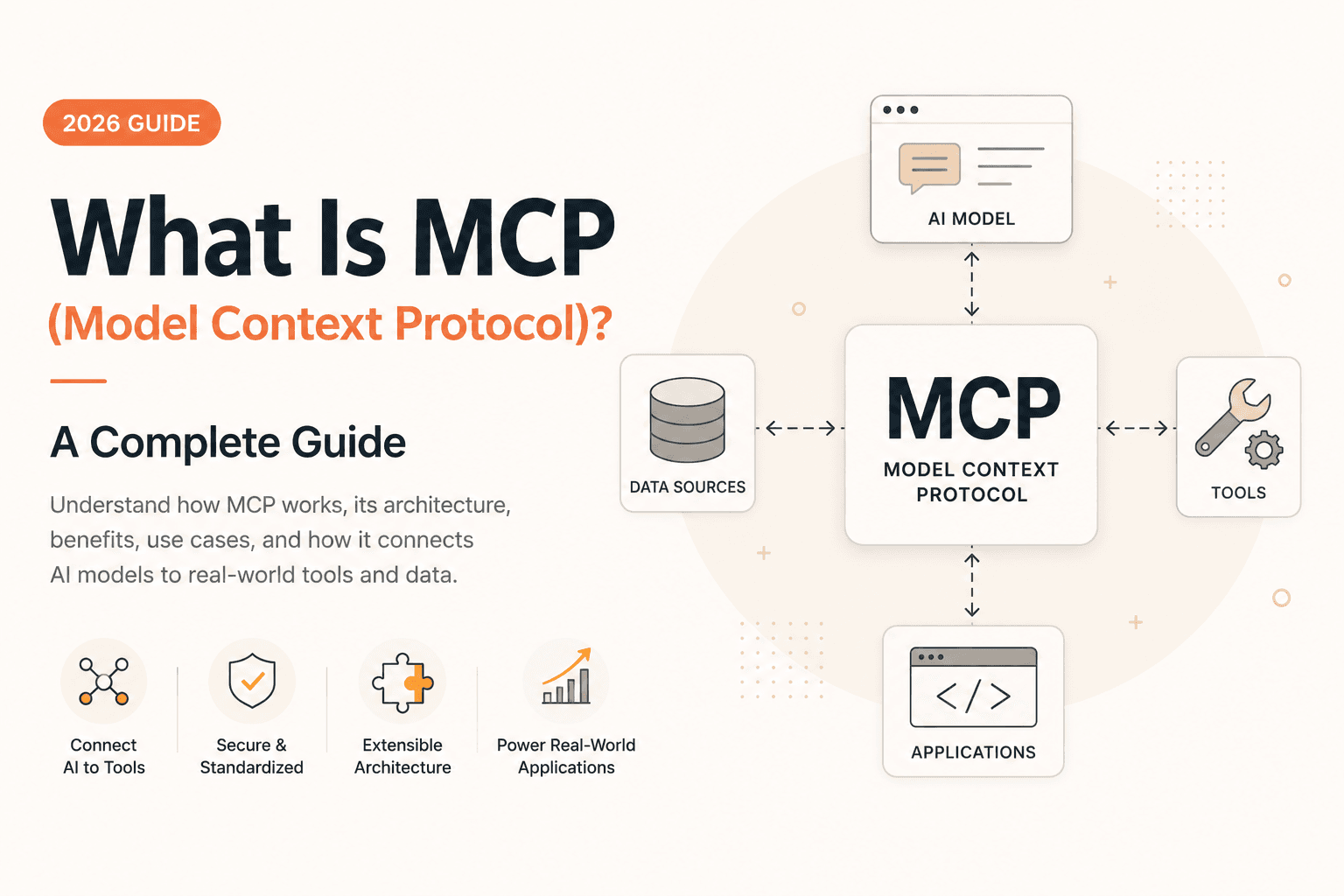
What Is MCP (Model Context Protocol)? A Complete Guide (2026)
What MCP (Model Context Protocol) is, how it connects AI models to tools and data, and why Anthropic donated it to the Linux Foundation in 2025.
What is MCP (Model Context Protocol)?
If you are a developer wondering if this is a passing buzzword or a transformative tool, this guide explains how MCP standardizes AI-to-software connections. In short, MCP is an open standard that enables AI models to interact with external data and tools securely. In plain terms, what is mcp refers to a modern approach to connecting software systems through standardized, controllable interfaces, helping tools collaborate more reliably while keeping trust, permissions, and context front and center.
What is mcp and why it feels different from typical integrations?
When people ask what is mcp, they usually expect a clean definition—something like “it’s a protocol” or “it’s an API framework.” That’s partly true, but the more interesting story is how MCP changes the experience of building connected systems. Traditional integrations often feel like a patchwork: one team writes an endpoint, another team consumes it, documentation drifts, edge cases multiply, and suddenly you have fragile glue that breaks whenever either side evolves.
MCP is different in the way it nudges you toward consistency. Instead of inventing a new connector style for every pair of tools, MCP encourages a shared method for describing capabilities—what a tool can do, how it should be called, what inputs it expects, and what outputs it returns. The result is a more predictable integration landscape. From a personal perspective, I’ve seen how quickly “quick integrations” become long-term maintenance burdens; MCP’s promise is to reduce that burden by standardizing the shape of interactions.
But there’s an emotional difference too. When you work with ad-hoc integrations, you often feel like you’re negotiating with uncertainty—debugging network behavior, tracing mismatched schemas, and chasing versioning issues. When you work with an MCP-style workflow, you tend to feel you’re negotiating with clarity: the system’s capabilities are explicit, boundaries are defined, and your app can reason about how to use tools without needing bespoke knowledge for every integration.
A new interface mindset for tools and assistants
To understand what is mcp, it helps to shift your mindset from “apps call apps” to “tools expose capabilities in a consistent way.” In most systems, the integration story is centered on endpoints: URLs, HTTP methods, request bodies, and response formats. That’s essential, of course—but MCP adds a layer of capability structure. A tool doesn’t just exist as an opaque service; it’s described so an orchestrator (including AI-driven assistants) can discover what it can do and then invoke it properly.
I think this matters because modern software systems rarely perform a single action. They chain steps: fetch data, transform it, verify it, apply business logic, and then produce a result. If each step is custom-coded, you end up with brittle pipelines. When what is mcp is used thoughtfully, those pipelines can become more modular. Tools become “plug-compatible” under a shared interface contract, which is a big deal in teams where multiple tools evolve independently.
Another subtle point: structured capability descriptions make it easier to govern behavior. When an orchestrator knows which actions are allowed, it can enforce policies before execution. That reduces the risk of accidental misuse—like calling the wrong function with the wrong assumptions. This is where MCP can feel like a security upgrade, not just a developer convenience.
Discovery and invocation become more transparent
A common pain point in integrations is that the consumer often doesn’t know enough about the provider. Even with good docs, you still need to remember which endpoints exist, which ones require authorization, which parameters are optional versus required, and which operations are safe. MCP-style systems aim to reduce that cognitive load by making capabilities discoverable and invocation patterns repeatable.
In practice, this can transform how an assistant or tool orchestrator behaves. Instead of “blindly” calling something because it was configured earlier, the orchestrator can check what’s available now. Tools can also signal their capabilities in a way that’s aligned with the integration framework. From my standpoint, this makes debugging easier: when something fails, you’re more likely to trace the issue to mismatched capability expectations rather than guessing about hidden assumptions.
Also, transparency supports iteration. As your tools improve, you want integrations to evolve without constant rewrites. A structured interface reduces the risk that a small change in one tool breaks downstream logic. MCP’s value is partly about time: it helps you spend less of it on integration glue and more on building product outcomes.
Why standardization changes the whole developer experience
Let’s be honest—standardization can feel like bureaucracy. Yet in integration-heavy systems, shared patterns pay back quickly. What is mcp becomes meaningful when you realize it’s not just about connecting tools; it’s about reducing the “integration tax” that accumulates across projects.
Consider the real-world scenario: a company uses multiple services—databases, CRM platforms, ticketing systems, documentation tools, and internal automation scripts. Each integration has unique quirks: rate limits, authentication methods, data formats, and semantic differences. How does MCP standardization reduce the 'integration tax'? By providing a consistent scaffolding, it allows orchestration layers to interact with diverse tools without bespoke code. This reduces maintenance burdens and simplifies engineering onboarding.
I’ve also noticed something else: standardization improves onboarding. New engineers can learn one integration approach rather than learning a bespoke connector for every system. And when the integration style is predictable, it encourages teams to build reusable components—things like shared authentication modules, common validation layers, and consistent logging. In other words, MCP can act like a “centripetal force” that pulls scattered connectors into a more coherent system design.
Core principles behind MCP — capability, control, and context
To move beyond the phrase what is mcp, we should unpack its underlying principles. While terminology varies across implementations, the conceptual core typically revolves around the idea that tools expose capabilities in a structured way, and that these capabilities can be invoked with clear inputs and outputs. That’s the skeleton. The muscles are control and context.
In my experience, many integration failures aren’t caused by broken code—they’re caused by unclear intent. A tool may behave differently depending on what the user meant, what data is relevant, or what policy should apply. MCP’s approach encourages the integration layer to keep context explicit and to treat tool execution as a governed action, not a magical black box.
This is where the “newness” comes from: MCP doesn’t just connect; it frames the interaction. It treats tool calling as a first-class capability in the system architecture. That framing can help developers design safer workflows, create more reliable automation, and build assistant-like behavior that’s less prone to hallucinated assumptions.
Capability modeling that tools can actually live with
At the core of MCP is Capability Modeling. Key benefits include:
- Defined actions: Tools explicitly state what they can do.
- Structured inputs: Orchestrators know exactly what parameters to send.
- Validated outputs: Responses follow a predictable schema, reducing runtime errors.
The tool’s capabilities need to be described so a caller can select the right action and provide the right parameters.
This is more than documentation. It’s an operational contract. When capability descriptions are structured, they can be validated. You can check whether required parameters are present before calling. You can also enforce type constraints, detect missing fields early, and provide better error messages. That reduces runtime surprises.
From a developer perspective, I like capability modeling because it encourages better tool design. If you have to describe what a tool can do, you’re forced to clarify boundaries. You end up creating tools that are more atomic and composable—tools that do one thing well rather than giant endpoints that try to handle every scenario. That’s a major quality win.
Control and safety for tool execution
Why is MCP important for AI safety? It prevents unrestricted actions by implementing:
- Granular Permissions: Limit tools to specific environments.
- Policy Enforcement: Check authorization before execution.
- Scoping: Restrict resource access to prevent data leaks.
If an assistant can call any tool without constraints, you can end up with data leaks, accidental deletions, or unauthorized operations. MCP-style thinking pushes you toward explicit control mechanisms.
Control can include authentication, authorization, and policy checks before execution. It can also include scoping: what resources a tool may access, what environments it may affect (like production versus staging), and what limits apply (like rate limits or maximum output sizes). When these controls are integrated into the interaction model, they stop being bolt-ons.
Personally, I’ve found that the more “powerful” the tool calling mechanism becomes, the more important it is to treat governance as part of the system design. MCP’s conceptual framing helps because it encourages developers to define the allowed boundaries as part of how tools are described and invoked. In other words, safety becomes systemic rather than an afterthought.
Context: making the right calls at the right time
Contextual awareness is vital for AI tool execution. Without explicit context—such as user intent, project IDs, and time sensitivity—even a functional tool can produce irrelevant results. MCP ensures that every tool call is framed by the necessary state data. Therefore, context needs to flow into tool invocation.
In many real deployments, context includes user intent, relevant identifiers (like customer IDs or project keys), time sensitivity, and the state of ongoing tasks. MCP’s approach supports this by making tool invocation a structured step in a larger workflow. That means context can be assembled deliberately before the call and validated afterward.
I also think context is about interpretability. When an assistant can explain what it’s doing—“I will call this tool with these parameters because you asked for X”—debugging gets easier and user trust increases. MCP’s capability-first, invocation-focused framing makes it more natural to create that explanatory layer. This is a subtle but significant benefit: the system becomes easier for humans to oversee.
How MCP fits into modern AI-assisted workflows and automation
Now let’s connect what is mcp to what many readers actually want: building assistant-driven automation that can interact with real tools. In the past, AI assistants often had to rely on narrow functions or rigid workflows. You could prompt them, but tool execution was hard to standardize and hard to govern.
MCP changes the architecture. Instead of embedding tool logic directly into the assistant’s prompt or hardcoding tool descriptions, MCP-style tool exposure can make the assistant’s interaction layer more systematic. The assistant can discover available actions and call them through a consistent interface.
This enables more dynamic automation: workflows that adapt based on what tools are available, what data is relevant, and what constraints apply. It can also make multi-step operations more reliable, because each step’s invocation structure is consistent and verifiable.
From prompt-based thinking to tool-based execution
A common limitation in AI systems is the gap between “language understanding” and “operational correctness.” An assistant might know what you want but still struggle to execute it correctly across multiple tools. This gap widens when integrations are inconsistent or undocumented.
When you ask what is mcp in the context of AI, you’re often asking how to bridge that gap. The key idea is that tool calling becomes part of the structured workflow, not a vague instruction. The assistant can select the right tool capability, supply the right arguments, and interpret structured outputs.
In my view, that’s one reason MCP feels compelling: it makes AI actions more deterministic. Not perfectly deterministic—AI still needs validation—but more deterministic than free-form “do the thing” instructions. When tool invocation is constrained by a contract, the system behaves closer to a reliable automation engine.
Multi-tool orchestration with fewer brittle seams
Real automation seldom uses a single tool. You might search for data, then retrieve details, then update records, then write a report. Each step can involve a separate system with its own integration pattern. That is where brittle seams appear.
MCP’s standardized interface approach helps reduce those seams. When each tool exposes capabilities in a consistent manner, an orchestrator can coordinate across tools without reinventing the integration logic for every new capability. You spend less time creating one-off wrappers and more time building orchestration strategies.
I’ve seen teams waste weeks on glue code when they could have invested in orchestration quality earlier. MCP’s philosophy can help redirect that effort. It encourages building a higher-level “planner” layer that decides what to call and then relies on consistent invocation. The result is not just less code—it’s fewer integration surprises.
Practical examples of where MCP shines
To make this concrete, consider common automation tasks: customer support triage, internal knowledge retrieval, data enrichment, and workflow approvals. In each case, the assistant needs access to multiple systems—like ticketing platforms, knowledge bases, and CRM records.
Common use cases for MCP include:
- Customer Support: Triage tickets by fetching CRM data and knowledge base articles.
- Data Enrichment: Automatically update lead records using external APIs.
- Workflow Approvals: Route complex cases to human supervisors via structured escalation tools.
From a design perspective, I also like that this approach encourages gradual improvement. You can start by exposing a small set of safe capabilities, evaluate the assistant’s behavior, and then add more tools over time. That incremental path is often what teams need to ship reliably instead of betting everything on a massive integration at once.
Implementation considerations — planning, reliability, and observability
If you’re thinking about adopting what is mcp, it’s important to treat it like a product architecture decision rather than a mere integration detail. Implementation choices determine whether MCP helps you build robust systems or simply creates another layer you can’t debug.
The biggest success factor is planning: defining which tools to expose, how to scope them safely, and what validation to apply. The second is reliability: ensuring tool calls behave well under load and handle failure gracefully. The third is observability: being able to trace what happened when something goes wrong.
I’ll be direct here—many tool-calling systems fail not because the interface is wrong, but because teams don’t instrument the workflow. MCP can make tool invocation clearer, but you still need logs, traces, and metrics to see how the whole chain performs in production.
Designing tool boundaries that reduce failure
Tool boundaries are where quality is won. When you expose a tool capability, you should define what it does and what it does not do. If the tool’s responsibilities are too broad, you end up with complex inputs and outputs that are hard to validate. If responsibilities are too narrow, you create excessive orchestration overhead.
For what is mcp, the best tool boundaries are often “capability-level” rather than “service-level.” Instead of exposing a huge “CRM everything endpoint,” expose specific actions like “retrieve customer summary” or “create support ticket.” This reduces ambiguity and improves the reliability of invocation.
I’ve also learned that boundaries should align with permission models. If a user role should only access certain actions, your tool capabilities should map to those actions. Otherwise, you end up with complicated policy logic scattered across the system. A capability-first design makes policy enforcement more straightforward.
Validation and error handling as first-class design
In structured tool calling, validation should be deliberate, not accidental. When the assistant or orchestrator is about to invoke a tool, you want to validate inputs early and verify outputs afterward. That prevents cascading failures where one bad call leads to another.
When people ask what is mcp and compare it to simpler integrations, they often overlook error handling. In a robust MCP-style system, errors are not just “something broke.” Errors become structured events: what capability failed, why it failed, and what a recovery path might be. That makes the overall workflow more resilient.
In my experience, teams benefit from designing for failure modes upfront: timeouts, authentication issues, schema mismatches, partial data, and rate limits. Instead of treating those as edge cases, treat them as expected behavior. That mindset transforms your tool orchestration from fragile to dependable.
Observability: tracing actions across tools
Effective MCP implementation requires three pillars of observability:
- Correlation IDs for tracking workflow runs.
- Structured Logging for inputs and outputs.
- Latency Metrics to identify performance bottlenecks in the tool chain.
A good observability strategy includes correlation identifiers for a workflow run, structured logging of tool inputs and outputs (with sensitive data redacted), and metrics for latency and failure rates per capability. When you do this, you can quickly answer questions like: “Which tool is slowing down our workflow?” or “Are failures clustered around a specific capability?”
I like to think of observability as the difference between “we built it” and “we can operate it.” What is mcp becomes valuable when it’s reliable under real conditions, not just functional in a demo. Observability ensures you can refine the system over time and build user trust through consistent performance.
Conclusion
In summary, the Model Context Protocol (MCP) represents a fundamental shift toward structured, safe, and governable AI integrations. By standardizing how tools expose capabilities, developers can build more reliable and deterministic AI-assisted workflows, enabling controlled and safe invocation, and keeping context explicit so the right actions happen at the right time; when you implement it with well-designed tool boundaries, strong validation, and thorough observability, MCP-style integrations can reduce brittle glue code, improve reliability, and make AI-assisted workflows feel more deterministic, governable, and trustworthy in real production environments.
Related
Resources
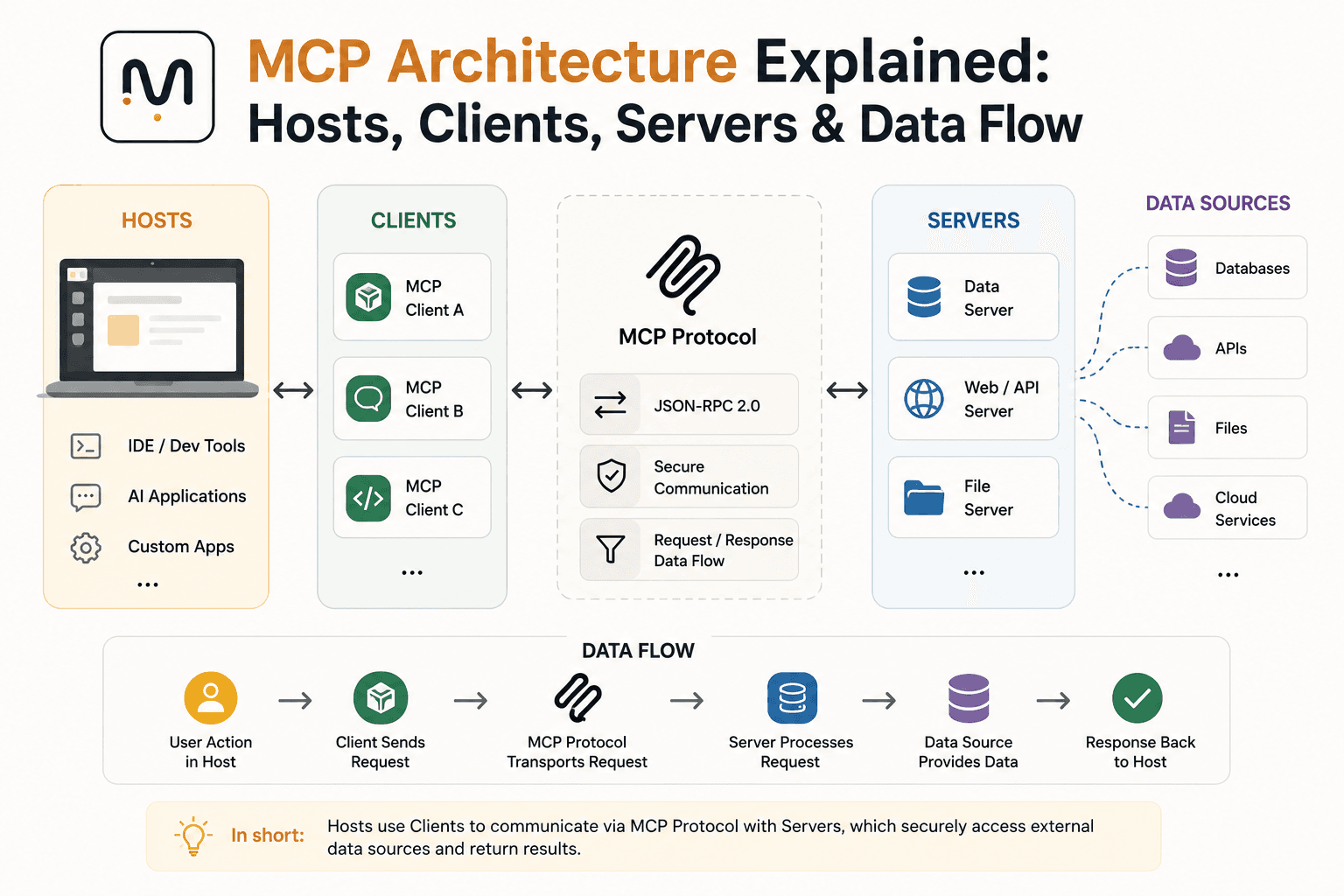
MCP Architecture Explained: Hosts, Clients, Servers & Data Flow

OpenRouter API Tutorial: How to Connect & Fetch LLM Responses (JS/Node.js)
The Best AI Tools for Developers in 2026
Why Is Next.js Fast Locally but Slow on Vercel + Supabase?