Why Is Next.js Fast Locally but Slow on Vercel + Supabase?
App is fast locally but slow on Vercel? The cause is often region mismatch between Vercel and Supabase, not your code. Here's the fix.
Why Is Next.js Fast Locally but Slow on Vercel + Supabase?
Quick answer: If your Next.js app is fast on localhost but slow in production on Vercel, the most common cause isn't your code, cold starts, or Supabase itself — it's region mismatch. Vercel's Serverless Functions and your Supabase database are likely running in different geographic regions, and every database call has to cross that distance twice (there and back). The fix is co-locating your Vercel function region with your Supabase database region.
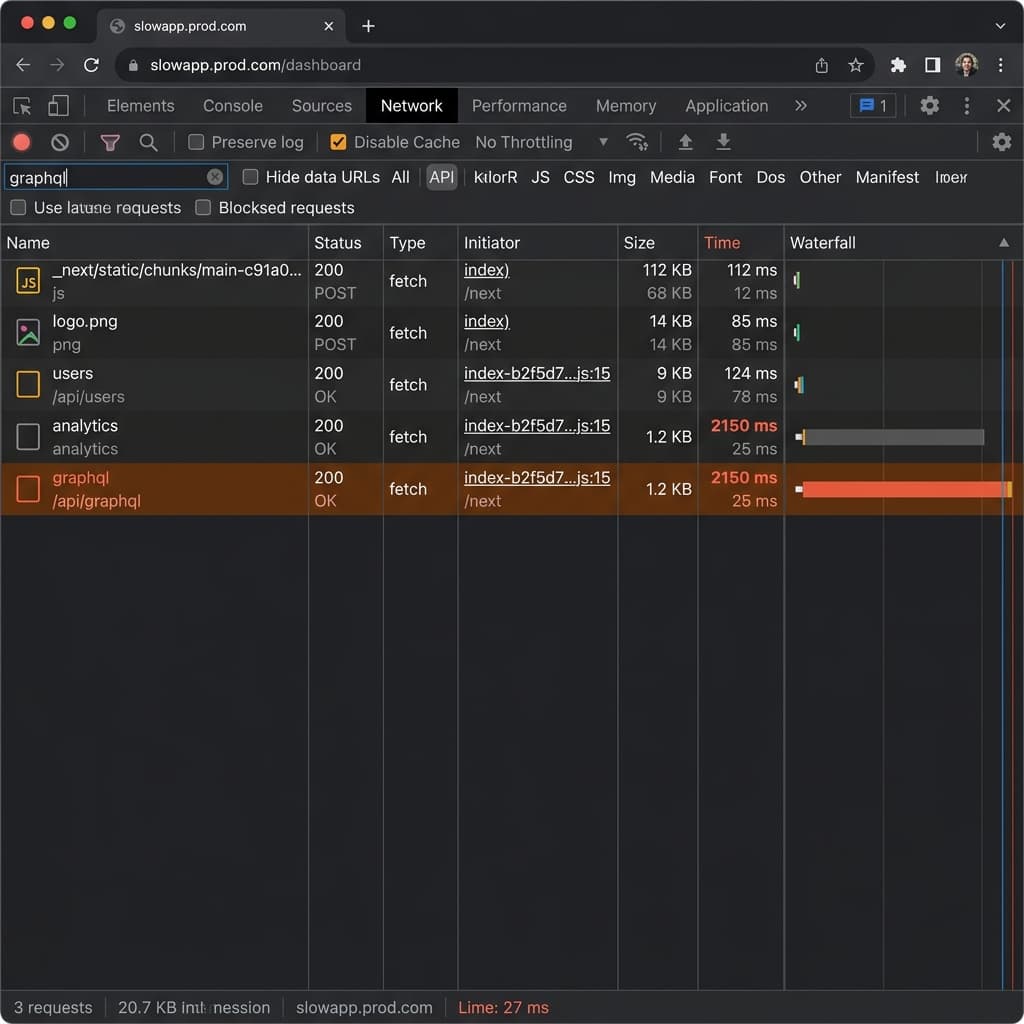
It's a tale as old as modern web development: you build a Next.js app, hook it up to Supabase, and everything feels blazing fast on localhost:3000. The moment you deploy to Vercel and hit production, your API routes crawl and your Time to First Byte (TTFB) spikes to 1–2 seconds.
You might blame Supabase for being "slow," or Vercel Serverless Functions for "cold starts." But 9 times out of 10, the real culprit is geographic distance — your compute and your database are sitting on opposite sides of the planet.
What Is TTFB, and Why Does It Spike in Production?
Time to First Byte (TTFB) is the time between a browser requesting a page and receiving the first byte of the response. Locally, TTFB is near-zero because your Next.js server and your database (often running via Docker, or accessed over a fast local network) sit right next to each other.
In production, that changes completely. Your Vercel Serverless Function and your Supabase Postgres instance are now two separate services, each running in its own cloud region — and every network hop between them adds real, physical latency that no amount of code optimization can remove.
Why Is Vercel + Supabase Slow in Production? The Cross-Region Round Trip
When you create a new Vercel project, the default region for Serverless Functions is usually iad1 (Washington, D.C., USA).
Meanwhile, when you set up Supabase, you may have picked a region closer to your users — say, ap-southeast-1 (Singapore) or eu-central-1 (Frankfurt).
Here's what happens on a single API request:
| Step | Hop | Approx. Latency |
|---|---|---|
| 1 | User (Asia) → Vercel Function (iad1, USA) | ~200ms |
| 2 | Vercel Function (USA) → Supabase DB (Singapore) | ~250ms |
| 3 | Supabase DB (Singapore) → Vercel Function (USA) | ~250ms |
| 4 | Vercel Function (USA) → User (Asia) | ~200ms |
Figures are illustrative round-trip estimates for USA↔Southeast Asia and will vary by network conditions.
If your API route makes two sequential database calls — fetch a user profile, then fetch their posts — that cross-ocean latency multiplies. Your user stares at a blank screen for nearly 2 seconds, waiting on network distance alone, not application logic.
You didn't notice this locally because you were the only user, without complex sequential data-fetching blocking the render — or you were running Supabase locally via Docker, with zero network hop at all.
How to Fix High TTFB: Co-Locate Vercel and Supabase
To fix high TTFB and reduce latency, co-locate your Vercel Serverless/Edge Functions with your Supabase database — ideally in the same cloud region, or at least the same geographic area.
Step 1: Find Your Supabase Database Region
Go to Supabase Dashboard → Project Settings → General and check the Region field. Let's assume it's ap-southeast-1 (Singapore).
Step 2: Change Your Vercel Function Region
- Go to Vercel Dashboard → Project Settings → Functions.
- Under Function Region, change the default from
iad1(Washington, D.C.) tosin1(Singapore). - Save, then trigger a new deployment — existing deployments won't switch regions automatically.
Vercel maps its regions directly to AWS regions in most cases:
| Vercel Region | AWS Region | Location |
|---|---|---|
iad1 | us-east-1 | Washington, D.C., USA |
sin1 | ap-southeast-1 | Singapore |
fra1 | eu-central-1 | Frankfurt, Germany |
hnd1 | ap-northeast-1 | Tokyo, Japan |
Matching the Vercel function region to your Supabase project's underlying AWS region gives you near-zero network latency between your Next.js backend and your Postgres database. You can confirm exact region mappings in Vercel's Edge Network & Regions documentation and Supabase's platform region list.
What if My Audience Is Global?
If your users are spread worldwide, moving your Vercel function to Singapore fixes database latency for Asian users — but users in New York will now face slower function execution.
For a global audience, three strategies work well together:
- Edge Functions + read replicas. Vercel Edge Functions can run close to each user worldwide. Pair them with Supabase Read Replicas (available on higher-tier plans) so each Edge Function queries the nearest replica instead of a single distant primary database.
- Aggressive caching. Keep Serverless Functions in one region matching your primary database, and lean on Next.js Data Cache (
fetchwithnext: { revalidate }) or Incremental Static Regeneration (ISR). Let the CDN serve global users instantly, and only pay the latency cost when revalidating. - Optimistic UI. For mutations (inserts/updates), update the UI instantly in React while the Vercel-to-Supabase request completes in the background, hiding round-trip latency from the user.
FAQ
Does Vercel automatically match my Supabase region?
No. Vercel defaults new projects to iad1 (Washington, D.C.) regardless of where your Supabase database lives. You must set the Function Region manually in Project Settings.
Will changing my Vercel region affect my existing deployments? Yes — you need to trigger a new deployment after changing the region setting. Existing deployments keep running in their original region until redeployed.
Is region co-location enough, or do I still need indexes and connection pooling? Co-location fixes network-distance latency, but it won't fix slow queries caused by missing indexes, or connection exhaustion in serverless environments. Those are separate, equally important optimizations — see our Supabase performance guide for indexing, Supavisor pooling, and RLS tuning.
What if my Supabase project and Vercel account are on free tiers? Region selection is available on Supabase's free tier at project creation, and Vercel's Function Region setting is available on all plans. Read replicas for global audiences typically require a paid Supabase plan.
Stop Blaming the Tools
Before ripping out Supabase or migrating away from Vercel Serverless Functions because they "feel slow," check your deployment regions first. Co-locating Vercel and Supabase is one of the single most impactful performance changes you can make for a full-stack Next.js application — and it takes minutes, not a migration.
Related
Resources
MCP Architecture Explained: Hosts, Clients, Servers & Data Flow
What Is MCP (Model Context Protocol)? A Complete Guide (2026)

OpenRouter API Tutorial: How to Connect & Fetch LLM Responses (JS/Node.js)

The Best AI Tools for Developers in 2026