AI Prompt for Clothing Mockup: Templates + Design Placement Fix (2026)
AI prompts for clothing mockups — flat lay, on-model, ghost mannequin — by garment type, plus why AI can't reliably put your exact logo on a shirt and what actually works.
AI Prompt for Clothing Mockup: Formula, Templates & the Design-Placement Problem (2026)
Quick Answer
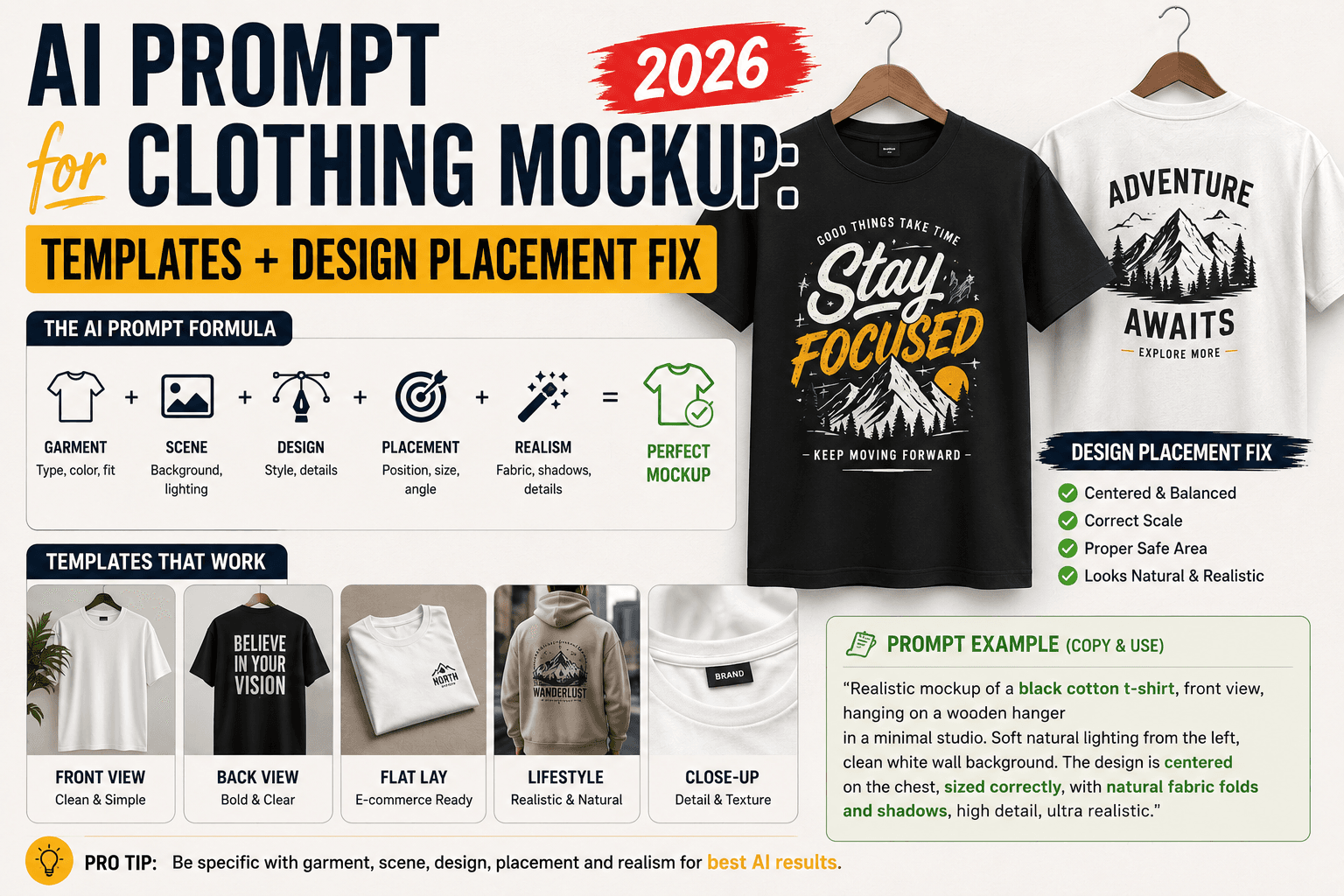
A good AI prompt for a clothing mockup needs the garment type, the mockup style (flat lay, on-model, ghost mannequin, or hanging), fabric and lighting details, and a clean, e-commerce-appropriate background. The one thing worth knowing before you start: if you're a print-on-demand seller trying to show your specific logo or graphic printed on a shirt, general AI image generation is the wrong tool for that job — it can't reliably reproduce an exact uploaded design without distorting it. For that specific need, a dedicated mockup generator (Placeit, Printful's mockup tool, or Canva's mockup templates) that overlays your real design file onto a template is the correct approach; AI image generation is better suited to styling the scene itself.
Two different jobs: styling a scene vs. showing your exact design
This distinction matters more for clothing than almost any other product category, and it's worth understanding before you write a single prompt:
- Job one: generating a styled scene or blank garment. You want a realistic photo of a plain t-shirt, a model wearing a hoodie, or a folded stack of sweaters — for inspiration, a background, or a generic product shot where the exact design doesn't matter yet. General-purpose AI image generators handle this well.
- Job two: showing your actual logo or graphic printed on the garment. You already have a specific design — a logo, a graphic, text — and need it to appear accurately on the shirt, in the right position, undistorted. This is a fundamentally different task, and it's the one AI image generation is genuinely unreliable at, for the same underlying reason AI struggles with text in images: it's not placing a file, it's reinterpreting a described pattern, and fine details, exact colors, and precise linework routinely come out warped or altered.
If you're a print-on-demand seller, job two is almost certainly what you actually need — and the fix isn't a better prompt, it's a different kind of tool. More on that below.
Mockup types and what to specify
- Flat lay — the garment laid flat, photographed from above, no model or mannequin
- On-model — worn by a person, useful for showing fit, drape, and styling
- Ghost mannequin — shows the garment's shape and volume with no visible model or mannequin, a standard e-commerce technique
- Hanging — the garment on a hanger, showing natural drape
- Folded/stacked — folded flat, often used for showing color or size variants together
- Close-up detail — texture, stitching, or fabric close-ups, used to build trust in quality
The clothing mockup prompt formula
- Garment — the specific item (t-shirt, hoodie, dress, jacket) and color
- Mockup type — flat lay, on-model, ghost mannequin, hanging, or folded
- Fabric and texture cues — cotton, denim, knit, silk — specific material improves realism
- Lighting — soft natural light or clean studio lighting, matched to your brand
- Background — plain, neutral, or a lifestyle setting depending on mockup type
Formula in one line:
[Garment/color], [mockup type], [fabric detail], [lighting], [background], e-commerce product photography style
Prompt templates by mockup type and garment
| Type | Sample prompt |
|---|---|
| Flat lay t-shirt | "Plain white cotton t-shirt laid flat on a neutral beige background, soft natural overhead lighting, slight natural fabric wrinkles, minimalist e-commerce flat lay style" |
| On-model hoodie | "Person wearing an oversized black cotton-blend hoodie, standing in an urban outdoor setting, natural daylight, casual confident pose, streetwear e-commerce style" |
| Ghost mannequin dress | "Invisible mannequin effect showing a flowing summer dress with visible interior shape and no visible model or mannequin, clean white background, soft even studio lighting, e-commerce ghost mannequin style" |
| Hanging denim jacket | "Denim jacket hanging on a wooden hanger against a plain white wall, soft natural window light, visible fabric texture and stitching detail, e-commerce hanging product style" |
| Folded stack (sweaters) | "Neatly folded stack of knit sweaters in varying colors, soft overhead studio lighting, clean white background, minimalist product photography style" |
| On-model activewear | "Person in athletic leggings and a fitted top, dynamic mid-motion pose, bright natural outdoor lighting, activewear e-commerce style" |
| Close-up fabric detail | "Close-up macro shot of fabric texture and stitching on a denim pocket, soft directional side lighting, shallow depth of field, product detail photography style" |
For more prompt ideas across other product and lifestyle categories, our roundup of the best AI prompt websites covers several libraries worth browsing.
Fabric and material details that make mockups look real
Naming the actual fabric does more for realism here than almost any other single detail, because different materials behave completely differently under light and movement:
- Cotton — matte finish, soft natural wrinkles, even light diffusion
- Denim — visible woven texture, stiffer drape, subtle sheen along seams
- Silk or satin — visible light reflection, fluid drape, minimal wrinkling
- Knit/wool — visible texture and slight bulk, warmer light absorption
- Activewear/technical fabric — slight sheen, tighter drape against the body, less visible wrinkling
A prompt that just says "shirt" leaves this to chance; specifying "cotton jersey" or "ribbed knit" gives the model something concrete to render instead of defaulting to a generic, slightly plastic-looking fabric surface — a common giveaway of an under-specified mockup prompt.
The design-placement problem — and what actually solves it
This is the most important section for anyone selling actual printed merchandise, so it's worth stating plainly: if you need your specific logo, slogan, or graphic to appear accurately on a shirt, general AI image generation is not the right tool. The same limitation that makes AI unreliable at rendering clean text in an image applies just as much to reproducing an exact uploaded design on fabric — colors shift, linework warps, and small text becomes illegible almost every time.
The tools that actually solve this problem work differently: dedicated mockup generators — Placeit, Printful's built-in mockup tool, and Canva's mockup templates are the most widely used — let you upload your actual design file and place it onto a pre-made, professionally photographed template. The garment photo is real (or a high-quality 3D render), and your design is composited onto it precisely, with no reinterpretation. This is the standard workflow print-on-demand sellers use, and it's a different category of tool from an AI image generator entirely.
Where AI image generation genuinely helps in this workflow: styling the scene itself — a model, a background, a mood — that you then use as inspiration or a supplementary lifestyle shot alongside your dedicated mockup tool's product image, rather than trying to get one tool to do both jobs at once.
Common mistakes
- Trying to get AI to place your exact logo on a shirt. This is the single most common frustration in this category, and it's a tool-mismatch problem, not a prompting problem — use a dedicated mockup generator for this specific job instead.
- Leaving out the fabric type. A generic "t-shirt" prompt defaults to a flat, slightly unconvincing surface; naming the actual material fixes this immediately.
- Using a real, named influencer's likeness for on-model shots. Describe a generic model ("a woman in her 20s," "a man with short hair") rather than a specific real person, both for accuracy (AI won't reliably reproduce a real person's face anyway) and to avoid using someone's likeness without consent.
- Inconsistent lighting across a product set. If you're generating multiple mockups for the same listing (front, back, detail shot), reusing the same lighting and background description across all of them keeps the set looking cohesive rather than like three different photoshoots.
- Skipping the mockup type. A prompt with no mockup type specified tends to produce an ambiguous, awkwardly-framed result — always name flat lay, on-model, ghost mannequin, or hanging explicitly.
Hands-on impressions
Testing a flat lay t-shirt prompt with and without a specific fabric descriptor made the fabric-detail point concrete rather than theoretical: "a white t-shirt" produced a flat, slightly waxy-looking surface, while "white cotton jersey t-shirt with natural fabric wrinkles" produced something with visible texture and believable folds — a small wording change with a genuinely noticeable difference in output quality.
The design-placement limitation was exactly as expected going in: uploading a simple logo concept and asking the generator to "put this exact logo on the shirt, centered on the chest" came back with a plausible-looking but noticeably different version of the logo each time — close, but never pixel-accurate, and not something that would pass a client's or a print supplier's review. Switching to a dedicated mockup tool's upload-and-place workflow for that exact same logo took less time than the AI attempts and produced a precise result on the first try, which is the clearest possible confirmation that these are genuinely two different tools for two different jobs.
FAQ
What's the best AI prompt for a clothing mockup? Specify the garment and color, the mockup type (flat lay, on-model, ghost mannequin, or hanging), the fabric material, lighting, and background — fabric type in particular makes a bigger difference to realism than most other details.
Can AI put my logo or design on a shirt mockup accurately? Not reliably. AI image generation reinterprets a described design rather than placing an exact file, so logos and graphics often come out subtly warped or altered. Use a dedicated mockup generator like Placeit, Printful's mockup tool, or Canva instead for accurate design placement.
What's a ghost mannequin mockup? A product photography technique that shows a garment's shape and volume with no visible model or mannequin — commonly used in e-commerce to focus attention entirely on the clothing item itself.
Is AI good for print-on-demand product photos? It depends on the job. AI is useful for styling a scene, background, or generic mockup concept. For showing your exact printed design accurately, a dedicated mockup generator is the correct tool, not general AI image generation.
How do I make an AI clothing mockup look realistic instead of plastic-looking? Name the specific fabric (cotton, denim, silk, knit) rather than just the garment type, and specify natural lighting with slight, realistic wrinkles rather than an unnaturally smooth, flawless surface.
Should I use a real person or a described model for on-model mockups? Describe a generic model rather than referencing a specific real person — AI won't reliably reproduce a named individual's likeness anyway, and using someone's actual likeness without consent raises separate ethical and legal concerns.
Conclusion
Clothing mockup prompts work well for exactly one job: styling a believable scene — the garment, the fabric, the lighting, the setting. They don't work well for a second job that looks similar but isn't: placing your exact logo or design accurately onto that garment, which needs a dedicated mockup generator instead. Once you're using the right tool for each half of the job — AI for the scene, a mockup tool for your real design — the templates and fabric details above should get you to a usable, realistic product photo without needing a physical photoshoot.
Related
Resources
ChatGPT Professional Photo Prompt: 15 Studio-Quality Templates (2026)
AI Halloween Photo: Prompts That Actually Look Like You (2026)
AI Christmas Photo: The Viral Prompt + How to Actually Do It (2026)
AI Prompt for Instagram Post: Formula + Templates (2026)