AI Prompt for Food Menu Photo: Templates + What to Watch For (2026)
AI prompts for food menu photos by dish type — appetizers, mains, desserts, drinks — plus why AI images shouldn't replace real photos of what you actually serve.
AI Prompt for Food Menu Photo: Formula, Templates & the Honesty Problem (2026)
Quick Answer
A good AI prompt for a food menu photo needs the specific dish, a camera angle (overhead flat lay or a 45-degree angle are standard for menus), styling cues like garnish or steam, warm appetizing lighting, and a background that fits your brand — rustic wood, marble, or a dark moody surface. Before you use one on your actual menu, know the honest limitation: AI generates a plausible-looking dish based on your description, not a photo of the food you actually serve, so using it for a literal menu listing risks a mismatch between what customers see and what arrives at their table. AI-generated food photography is strongest for design concepts, social posts, and promotional graphics — not as a replacement for a real photo of your actual dish.
Before you start: what AI food photos are actually good for
This is worth addressing before any prompt template, because it's different from most other AI image use cases: a menu photo is a specific promise to a customer about what they're about to order. If an AI-generated image shows a burger with toppings, a portion size, or a plating style that doesn't match what your kitchen actually serves, the gap between the photo and the plate becomes a real source of customer disappointment, bad reviews, and — on delivery platforms specifically — a policy violation, since most major platforms require menu photos to accurately represent the food.
Where AI-generated food photography genuinely works well:
- Design concepts and menu layout mockups before a real photoshoot
- Social media posts and promotional graphics that evoke a mood or cuisine style rather than depicting one specific literal dish
- Seasonal or thematic marketing images (a "cozy soup season" graphic, for example) that aren't tied to one exact plate
- Background and atmosphere shots — table settings, restaurant ambiance — where an exact dish isn't the focus
Where it's a genuine risk: the actual photo next to a specific menu item's name and price, especially on a delivery app, where customers are ordering based on exactly what they see.
Angles and styles that make food look appetizing
Menu photography relies on a small number of angles and cues that consistently read as "appetizing" rather than flat or clinical:
- Overhead / flat lay — shot straight down, common for pasta, salads, pizza, and dishes with an interesting top-down composition
- 45-degree angle — the standard restaurant menu angle, showing both the top of the dish and enough side profile to convey height and texture
- Close-up / macro — used for texture-forward items (melting cheese, flaky pastry, a drink's condensation)
- Steam and freshness cues — visible steam for hot dishes, condensation on cold drinks, glossy sauce highlights — these small details do more for "appetizing" than almost anything else in the prompt
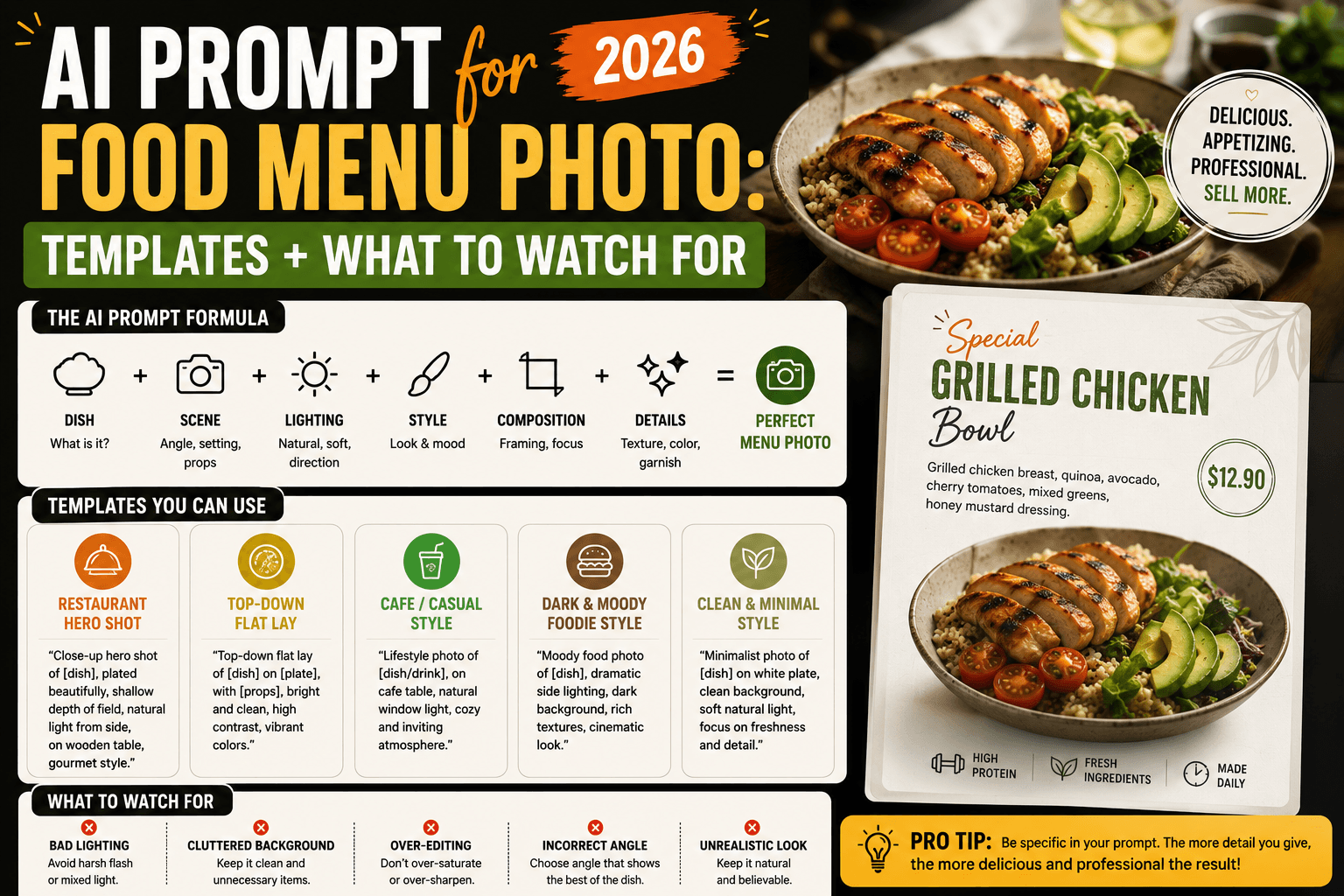
The food menu prompt formula
- Dish — the specific food item and key visible ingredients
- Angle — overhead, 45-degree, or close-up
- Styling cues — garnish, steam, sauce sheen, freshness indicators
- Lighting — warm and natural, or moody and dramatic, matched to your brand
- Background/surface — rustic wood, marble, dark slate, or a plain plate
Formula in one line:
[Dish], [angle], [styling cue], [lighting], [background/surface], appetizing food photography style
Prompt templates by dish type
| Dish type | Sample prompt |
|---|---|
| Pasta (overhead) | "Overhead shot of creamy pasta garnished with fresh basil and grated parmesan, natural window light, rustic wooden table background, appetizing food photography style" |
| Burger (45-degree) | "Juicy burger with melted cheese and fresh toppings, shot at a 45-degree angle, warm natural lighting, rustic wooden board, shallow depth of field, appetizing menu photography style" |
| Dessert (close-up) | "Close-up of a rich chocolate lava cake with a molten center, soft warm lighting, dark slate background, elegant dessert photography style" |
| Cocktail/beverage | "Refreshing cocktail with visible condensation on the glass, garnished with mint and citrus, bright natural lighting, bar-style background, beverage menu photography style" |
| Pizza (overhead) | "Fresh wood-fired pizza with melted cheese and a bubbling crust, overhead shot, rustic dark wood background, warm natural lighting, appetizing pizza photography style" |
| Salad / healthy bowl | "Vibrant colorful salad bowl with fresh vegetables, overhead shot, bright natural light, clean white background, healthy food photography style" |
| Breakfast item | "Stack of fluffy pancakes with maple syrup and fresh berries, warm morning light, rustic wooden table, cozy breakfast menu photography style" |
| Hot soup/noodles | "Bowl of steaming ramen with visible steam rising, rich broth, fresh garnishes, warm dramatic lighting, dark moody background, appetizing hot food photography style" |
For more prompt ideas across other product and lifestyle categories, our roundup of the best AI prompt websites covers several libraries worth browsing.
Making hot, cold, and fresh food look believable
Temperature and freshness cues are what separate a flat, static-looking food image from one that reads as appetizing:
- Hot dishes — specify visible steam, a glossy sauce sheen, or melted cheese still slightly stretching
- Cold drinks — specify condensation on the glass and ice that looks freshly poured, not melted
- Fresh produce — specify vibrant, saturated color and a slightly glistening surface (a light water-droplet effect on greens, for example)
- Baked goods — specify a golden-brown crust and visible texture (flaky layers, a crisp exterior) rather than a flat, uniform surface
Leaving these cues out is the single most common reason an AI-generated food photo looks technically correct but strangely unappetizing — the dish is identifiable, but it doesn't look like it was just prepared.
Common mistakes
- Using AI images as your literal, final menu photos. The honesty gap covered above is the biggest risk in this category — reserve AI images for concepts, social content, and promotional graphics rather than the exact photo next to a specific dish's name and price.
- Skipping steam, condensation, or freshness cues. Without them, food often looks accurately shaped but oddly lifeless.
- Overcomplicating the plate. Real menu photography usually keeps the plate itself relatively simple and lets the food be the focus — an overly busy prompt with too many garnishes and props can bury the dish itself.
- Ignoring your brand's lighting style. A fine-dining restaurant and a casual diner call for different lighting moods (moody and dramatic versus bright and warm) — matching this to your actual brand keeps generated images consistent with your real photography.
- Not specifying the angle. A prompt with no angle specified tends to produce an ambiguous, awkwardly framed result — always name overhead, 45-degree, or close-up explicitly.
Hands-on impressions
Generating the same pasta dish with and without freshness cues made the difference concrete: a bare "pasta with sauce" prompt produced something recognizable but flat, while adding "glossy sauce sheen, fresh basil, visibly warm" to the same basic idea produced something that actually looked freshly plated rather than static. The steam cue on a soup prompt had a similarly outsized effect — the same bowl of ramen looked notably more appetizing with "visible steam rising" added, a small phrase with a disproportionate impact on how "hot and fresh" the final image read.
The honesty consideration was also worth testing directly: generating an AI version of a specific existing dish and comparing it side by side with an actual photo of that dish showed a real, noticeable gap — similar in spirit, similar in category, but different in exact plating, portion, and garnish placement every time. That gap is exactly why this category calls for more caution than a generic lifestyle or product mockup: the output is a plausible dish, not your dish.
FAQ
Is it okay to use AI-generated photos on my actual restaurant menu? Proceed carefully. AI generates a plausible-looking dish based on your description, not a photo of the food you actually serve. Using it for design concepts, social posts, or promotional graphics is fine; using it as the literal photo next to a specific menu item's name and price risks a mismatch between the photo and what customers actually receive.
What's the best angle for a food menu photo? Overhead (flat lay) works well for pasta, salads, and pizza; a 45-degree angle is the standard menu angle for most dishes, since it shows both the top and enough side profile to convey height and texture; close-up shots work best for texture-forward details like melted cheese or flaky pastry.
How do I make AI-generated food look fresh and appetizing? Specify temperature and freshness cues directly — visible steam for hot dishes, condensation for cold drinks, a glossy sauce sheen, or a golden-brown crust — these details do more for "appetizing" than almost anything else in the prompt.
Can I use AI food photos for a delivery app listing? Be cautious. Most major delivery platforms require menu photos to accurately represent the food customers will receive, and an AI-generated image that doesn't match your actual dish can violate those policies or lead to customer complaints.
What's the best AI prompt structure for food photography? Combine the specific dish, a camera angle, styling and freshness cues, lighting matched to your brand, and a background or surface — appetizing food photography relies heavily on those freshness cues specifically.
Should I still hire a real food photographer? For your actual menu items — yes, for the reasons covered above. AI is a strong, fast option for concepts, social content, and marketing graphics that don't need to represent one exact, literal dish.
Conclusion
AI-generated food photography is genuinely useful for menu design concepts, social content, and promotional graphics — the templates and freshness cues above will get you a convincingly appetizing image fast. The one place to be careful is treating that image as an accurate stand-in for the actual dish a customer will receive: a menu photo is a promise, and an AI-generated one, however polished, is a plausible dish rather than your dish. Use AI to explore style and mood, and keep real photography of your actual food for anything customers will directly order against.
Related
Resources
ChatGPT Professional Photo Prompt: 15 Studio-Quality Templates (2026)
AI Halloween Photo: Prompts That Actually Look Like You (2026)

AI Christmas Photo: The Viral Prompt + How to Actually Do It (2026)
AI Prompt for Instagram Post: Formula + Templates (2026)