AI Prompt for Social Media Ad: Templates by Platform (2026)
AI prompts for social media ads on Instagram, Facebook, LinkedIn, and TikTok — by ad type, with the right aspect ratio for each platform and templates you can copy.
AI Prompt for Social Media Ad: Templates by Platform and Ad Type (2026)
Quick Answer
A strong AI prompt for a social media ad needs the product or subject clearly framed, lighting and color that matches your brand, a composition with deliberate empty space for headline text or a call-to-action button, and the correct aspect ratio for the platform you're posting to — square or 4:5 for Instagram feed, 9:16 for Stories/Reels/TikTok, 1.91:1 for Facebook and LinkedIn feed. As with most ad and thumbnail work, don't ask the AI to write your headline or price directly into the image — generate the visual, then add text separately in a design tool where it renders cleanly every time.
What makes an ad prompt different from a regular product photo prompt
An ad has one job a normal product photo doesn't: it has to justify itself in the half-second before someone scrolls past it, while a text overlay, a logo, and sometimes a price or discount badge all compete for the same frame. That changes the priorities. A gorgeous, perfectly centered product shot with no negative space leaves nowhere to put your headline. A background that's visually busy competes with your call-to-action instead of supporting it. Ad prompts need to be planned around what gets added after generation, not just what looks good on its own.
Get the aspect ratio right first
Before writing the prompt itself, know which platform you're generating for — it changes the composition, not just the crop:
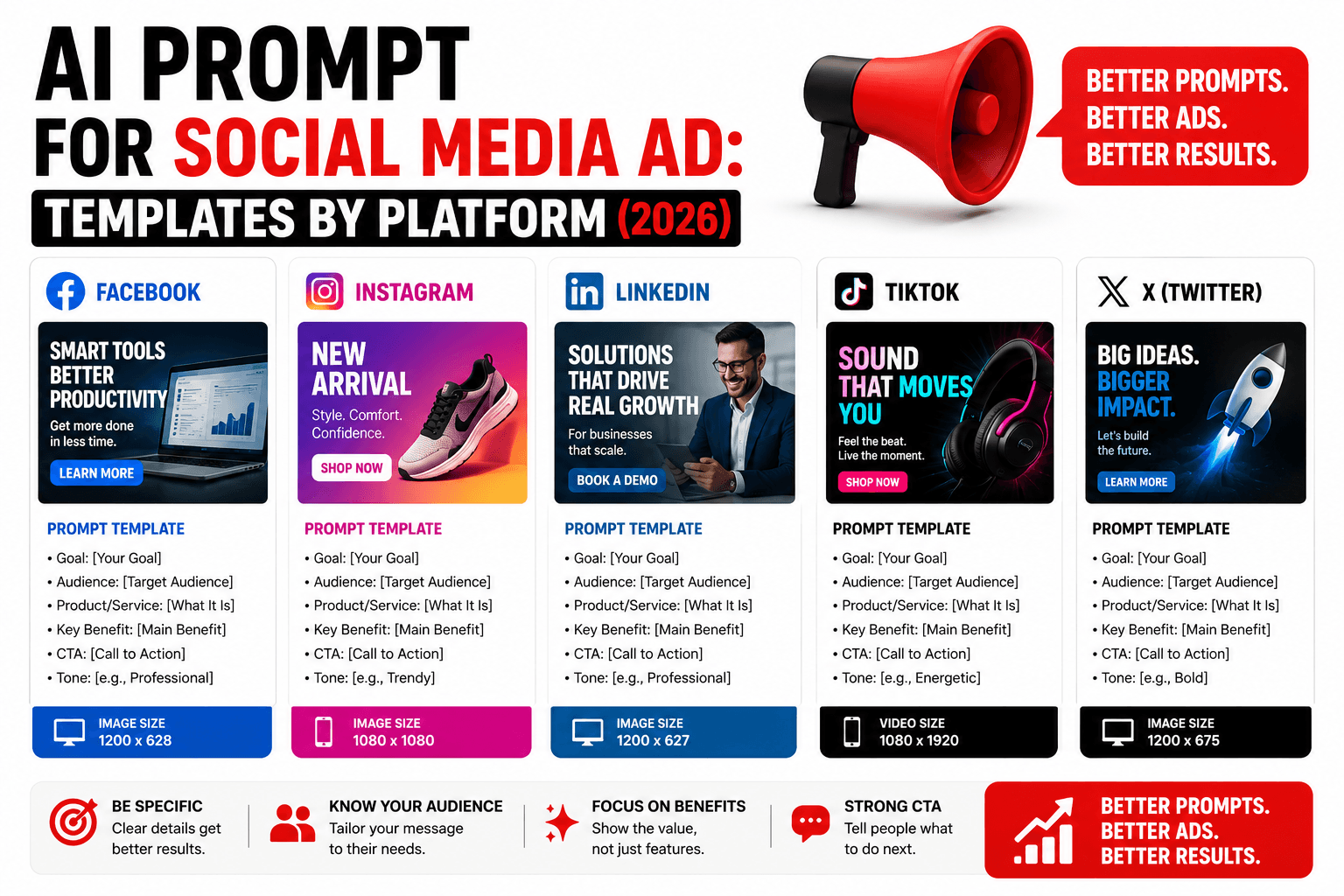
| Platform / placement | Aspect ratio | Typical size |
|---|---|---|
| Instagram feed | 1:1 or 4:5 | 1080×1080 or 1080×1350 |
| Instagram/Facebook Stories & Reels | 9:16 | 1080×1920 |
| Facebook feed | 1.91:1 or 1:1 | 1200×628 |
| LinkedIn feed | 1.91:1 or 1:1 | 1200×627 |
| TikTok | 9:16 | 1080×1920 |
| X (Twitter) | 16:9 or 1:1 | 1600×900 |
Specify the ratio in your prompt or generation settings, and compose with it in mind — a vertical Stories ad needs the subject and empty space arranged top-to-bottom, while a horizontal Facebook feed ad needs them arranged left-to-right.
The ad prompt formula
- Subject — the product, service, or person the ad centers on
- Setting/background — matched to brand tone: clean studio, lifestyle setting, bold color block
- Lighting and color — should reflect your brand palette, not just "nice lighting"
- Composition with negative space — deliberately leave room for a headline, logo, or CTA button
- Platform and style keyword — the aspect ratio plus a phrase like "scroll-stopping," "clean commercial ad style," or "high-converting social ad"
Formula in one line:
[Subject/product], [setting], [lighting/brand color], [composition with negative space for text], [platform] ad, [style keyword]
Prompt templates by ad type
| Ad type | Sample prompt |
|---|---|
| Instagram feed product ad | "Skincare bottle on a soft pastel pink background, clean studio lighting, minimalist composition with empty space on the left for headline text, e-commerce ad style, square format" |
| Instagram/TikTok Stories ad (vertical) | "Product held in hand at the bottom third of a vertical frame, bright natural lighting, clean uncluttered background, empty space at the top for a headline, 9:16 story ad format" |
| Facebook feed lifestyle ad | "Person using the product in a natural everyday setting, warm authentic lighting, candid genuine expression, lifestyle ad style, negative space reserved for caption text" |
| LinkedIn B2B service ad | "Confident professional in a clean modern office, muted brand-color palette, direct-to-camera expression, corporate ad style, space reserved for a headline and CTA button" |
| TikTok-style UGC ad | "Casual handheld phone-camera aesthetic, natural bright lighting, authentic unpolished look, person genuinely reacting to the product, vertical 9:16 UGC ad style" |
| Testimonial / social proof ad | "Happy customer holding the product, genuine warm smile, bright clean background, approachable and trustworthy mood, testimonial ad style" |
| Before & after ad | "Split-screen composition with a bold diagonal divider, dramatic contrast between before and after states, high-saturation colors, transformation ad style" |
| Sale / promo ad | "Product centered against a bold vibrant background, dynamic diagonal composition, high-energy brand colors, clear open space reserved for a percentage-off badge" |
| App download ad | "Smartphone mockup displaying a clean app interface, soft gradient background, modern minimalist style, space reserved for an app store badge and short headline" |
If you want more prompt inspiration beyond ads specifically, our roundup of the best AI prompt websites indexes several image-focused libraries worth browsing for adjacent styles and formats.
The text and compliance problem
Two separate issues come up constantly with AI-generated ad creative, and both are worth knowing before you build a whole campaign around one generation:
AI still isn't reliable at rendering ad text. Headlines, prices, and percentage-off badges typically come out garbled or oddly spaced when you ask the AI to generate them directly inside the image. The dependable workflow: generate the visual with AI, then add your actual headline, price, and CTA button in a design tool like Canva, or directly in the ad platform's built-in creative tools, where text renders perfectly and stays editable if you need to run A/B tests on copy.
Ad platforms have their own content and text-density rules. Beyond AI's technical limits, Meta, LinkedIn, and TikTok each maintain advertising policies covering prohibited claims, restricted categories, and how much of the image text-heavy overlays can occupy before an ad gets flagged or its reach gets throttled. Generating the image is the easy part; checking your specific platform's current ad policy before you spend budget on the campaign is the part that actually protects your account.
Common mistakes that hurt ad performance
- No negative space planned in. If the prompt doesn't leave room for text, you'll end up covering part of the product or subject when you add your headline afterward.
- Ignoring brand color consistency. A generic "nice lighting" prompt often drifts from your actual brand palette, which weakens recognition across a campaign.
- Wrong aspect ratio for the placement. A square image stretched or cropped into a 9:16 Stories slot usually cuts off the subject awkwardly — generate for the placement, not just one universal size.
- Too polished for platforms that reward authenticity. TikTok and Instagram Stories audiences often respond better to a genuine, slightly imperfect UGC look than an overly staged studio shot — match the prompt's polish level to the platform's native content style.
- Asking AI to write your price or CTA directly into the image. Covered above, but it's the single most common reason an otherwise strong AI ad visual looks unfinished or unprofessional.
Hands-on impressions
Generating the same product against a generic "studio background" prompt versus the Instagram feed template above made the negative-space point concrete rather than theoretical: the generic version filled the entire frame with the product, leaving no clean spot to drop a headline without covering it. Adding "empty space on the left for headline text" to an otherwise identical prompt produced a result that was genuinely ready to drop into an ad template — a small instruction with an outsized effect on whether the output was actually usable.
The text limitation showed up exactly as expected on a promo ad that asked for "20% OFF" rendered directly in the generation — legible on one attempt out of several, and not worth the retries compared to just adding the badge afterward in a few seconds inside a design tool. The lesson matched the YouTube thumbnail side of this same problem: let AI handle the visual, let a design tool handle anything that needs to be read.
FAQ
What's the best AI prompt for a social media ad? Combine the subject or product, a setting that matches your brand, lighting and color aligned to your brand palette, deliberate negative space for text, and the correct aspect ratio for your platform, plus a style keyword like "scroll-stopping" or "clean commercial ad style."
Can AI write the headline or price directly into my ad image? Not reliably. Most AI image generators struggle with clean, readable text and numbers. Generate the visual with AI, then add your headline, price, or CTA text separately in a design tool where it renders correctly every time.
What aspect ratio should I use for Instagram vs. TikTok ads? Instagram feed typically uses 1:1 or 4:5; Instagram/Facebook Stories, Reels, and TikTok use 9:16 (vertical); Facebook and LinkedIn feed ads typically use 1.91:1. Specify the ratio when generating so the composition matches the placement.
Should AI-generated ads look polished or authentic? It depends on the platform. Instagram feed and LinkedIn generally reward a more polished, studio-style look; TikTok and Stories/Reels placements often perform better with a more casual, UGC-style aesthetic that doesn't look overtly staged.
Do I need to worry about ad policy compliance with AI-generated images? Yes. Meta, LinkedIn, and TikTok all maintain their own advertising content and text-density policies separate from anything about how the image was made. Check your specific platform's current ad policy before launching a campaign built on AI-generated creative.
Where can I find more AI prompt ideas for marketing content? Our best AI prompt websites roundup covers several libraries with image-focused prompt collections that extend beyond ads into broader marketing and product photography styles.
Conclusion
A social media ad prompt succeeds or fails on planning, not just visual quality — leaving room for the text you'll add afterward, matching your brand's color and polish level, and generating for the exact aspect ratio your platform actually uses. The templates above cover the most common ad formats, but the habit worth carrying into every future prompt is the same one that shows up across nearly every AI image use case: let the AI handle the visual, and handle anything that needs to be read — a headline, a price, a CTA — separately, where it will actually come out clean.
Related
Resources
ChatGPT Professional Photo Prompt: 15 Studio-Quality Templates (2026)
AI Halloween Photo: Prompts That Actually Look Like You (2026)
AI Christmas Photo: The Viral Prompt + How to Actually Do It (2026)
AI Prompt for Instagram Post: Formula + Templates (2026)