Gemini AI Photo Prompt: 50+ Copy-Paste Ideas (2026)
50+ Gemini AI photo prompts you can copy, paste, and use with Nano Banana for selfies, portraits, couples, birthdays, festivals, and social photos.
Gemini AI Photo Prompt: 50+ Copy-Paste Ideas (2026)
Quick Answer
A Gemini AI photo prompt is a text instruction you give Gemini to generate a new image or edit an existing photo. The best prompts describe the subject, style, lighting, mood, framing, and what should stay unchanged.
Want to try one right now? Copy any prompt below, paste it into Gemini, upload your photo when needed, and generate your image.
Why Use a Structured Gemini AI Photo Prompt?
You do not always need a long prompt to create a good AI photo. However, using a structured Gemini AI photo prompt makes it easier to describe exactly what you want and reduces ambiguity.
A structured prompt gives Gemini clear information about the subject, setting, visual style, lighting, composition, and elements that should remain unchanged.
Best Gemini AI Photo Prompt Formula
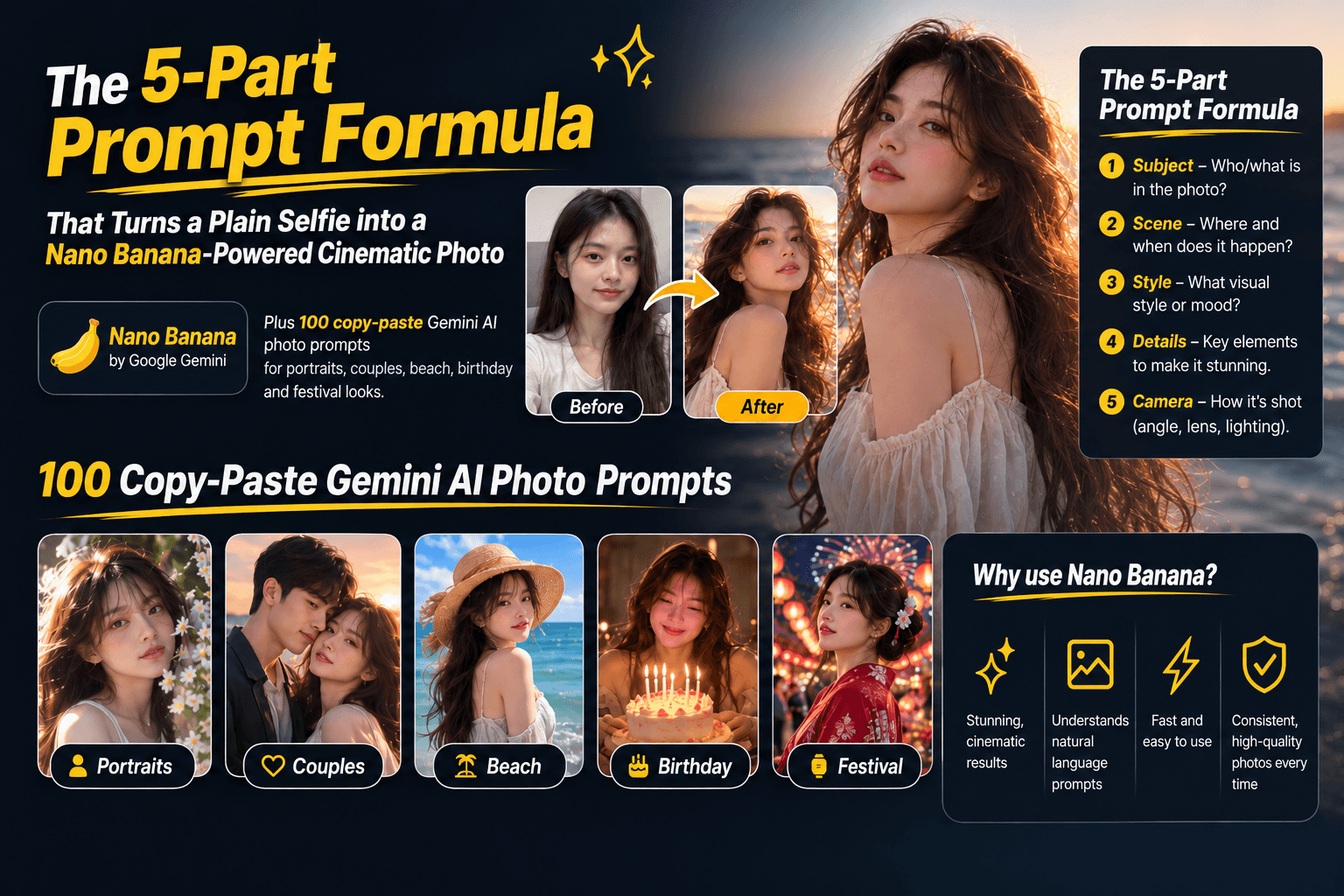
Use this simple formula to create better Gemini AI photos:
Subject + Style + Lighting + Mood + Framing + Preservation
For example:
Transform this photo into a cinematic portrait of me standing near an old temple gate. Use an editorial photography style, warm golden-hour lighting, shallow depth of field, and a calm, confident mood. Use a 4:5 portrait composition. Keep my face, hairstyle, and skin tone unchanged.
This structure gives Gemini clear instructions about what to create, how it should look, and what not to change.
The 6 Parts of a Gemini Photo Prompt
| Element | What to specify | Examples |
|---|---|---|
| Subject | Who or what is in the photo | Woman, couple, family, pet |
| Style | Visual appearance | Cinematic, editorial, vintage |
| Lighting | How the scene is illuminated | Golden hour, softbox, neon |
| Mood | Emotional feeling | Romantic, confident, nostalgic |
| Framing | Composition and aspect ratio | 4:5, 9:16, 1:1 |
| Preservation | What must remain unchanged | Face, skin tone, hairstyle |
How to Use Gemini AI Photo Prompts
You can use these prompts for either image generation or photo editing.
For photo editing
- Open Gemini.
- Upload the photo you want to edit.
- Copy one of the prompts below.
- Paste the prompt into Gemini.
- Generate the image.
- Ask for small changes if the result is not right.
For example:
Keep the same face and outfit, but make the background look like a sunset beach.
Small follow-up instructions can be easier than rewriting the entire prompt.
For image generation
You can also create a new image without uploading a photo. Describe the subject, visual style, lighting, mood, and composition as specifically as possible.
50+ Gemini AI Photo Prompts
Copy, paste, and customize these Gemini AI photo prompts for your own images.
1. Cinematic Portrait Prompts
1. Golden-Hour Portrait
Transform this photo into a cinematic 85mm portrait with shallow depth of field, warm golden-hour lighting, and a softly blurred urban background. Keep the face exactly as in the original.
2. Film-Noir Portrait
Create a dramatic black-and-white film-noir portrait with strong side lighting, subtle shadows, and rain-streaked window reflections. Preserve the original facial features.
3. Double-Exposure Portrait
Turn this photo into a dreamy double-exposure portrait blending the subject's silhouette with a sunset ocean horizon. Use realistic skin texture and a cinematic composition.
4. Movie-Still Portrait
Give this photo the look of a cinematic movie still with dramatic rim lighting, subtle film grain, rich colors, and a 4:5 portrait composition. Keep the face unchanged.
5. Editorial Portrait
Style this photo as a high-end editorial portrait with studio softbox lighting, sharp focus on the eyes, natural skin texture, and a neutral gray background.
6. Luxury Portrait
Transform this into a luxury fashion portrait with elegant styling, soft directional lighting, shallow depth of field, and a sophisticated neutral background. Preserve the face and skin tone.
7. Street Portrait
Turn this into a realistic street-fashion portrait photographed on a modern city street at golden hour. Use natural lighting, subtle background blur, and an editorial photography style.
8. Rainy Portrait
Create a cinematic rainy-day portrait with soft reflections, wet streets, natural skin texture, and moody overcast lighting. Keep the person's face and hairstyle unchanged.
2. Gemini AI Selfie Prompts
9. Luxury Selfie
Transform this selfie into a polished luxury lifestyle portrait. Keep my face, hairstyle, and skin tone unchanged. Add elegant surroundings, soft natural lighting, and realistic camera depth of field.
10. Travel Selfie
Turn this selfie into a realistic travel photograph taken in a beautiful European city. Keep my face unchanged and use natural daylight, realistic shadows, and a candid travel-photo composition.
11. Café Selfie
Transform this selfie into a cozy editorial café portrait. Keep my face exactly the same and add warm window light, a softly blurred coffee shop background, and natural colors.
12. Mirror Selfie
Turn this mirror selfie into a stylish fashion photograph. Keep my identity, face, body proportions, and outfit unchanged. Improve the lighting and create a clean luxury interior background.
13. Sunset Selfie
Transform this selfie into a cinematic sunset portrait with warm orange light, soft skin highlights, subtle lens flare, and a blurred outdoor background. Preserve my face and hairstyle.
14. Casual Selfie
Make this selfie look like a professionally photographed candid lifestyle image. Keep my face and natural appearance unchanged. Use soft daylight and a realistic background.
15. Winter Selfie
Transform this selfie into a cozy winter portrait with soft snowfall, warm clothing, natural overcast lighting, and a cinematic shallow depth of field. Keep my face unchanged.
3. Couple Photo Prompts
16. Golden-Hour Couple
Turn this into a romantic golden-hour couple portrait on a quiet street. Use warm tones, natural poses, and gentle background motion blur. Keep both faces unchanged.
17. Rainy-Night Couple
Create a cinematic rainy-night couple photo under an umbrella. Add neon city lights reflected on wet pavement and a cozy, intimate atmosphere. Preserve both faces.
18. Vintage Couple
Style this as a vintage 1970s film-camera couple photo with warm faded colors, soft grain, natural poses, and a 4:5 composition.
19. Autumn Couple
Create a cozy autumn couple portrait while walking through falling leaves. Use warm orange and brown tones, soft natural light, and a candid photography style.
20. Engagement Portrait
Generate an elegant engagement-style couple portrait with soft studio lighting, sophisticated clothing, and a blurred garden background. Keep both faces natural and recognizable.
21. Beach Couple
Transform this into a romantic beach couple photo during sunset. Use warm golden light, ocean waves, natural poses, and realistic skin tones. Preserve both faces.
22. Travel Couple
Turn this photo into a candid travel photograph of a couple exploring a beautiful city. Use natural daylight, realistic architecture, and documentary-style photography. Keep both faces unchanged.
23. Winter Couple
Create a cinematic winter couple portrait surrounded by soft snow and warm city lights. Use shallow depth of field and natural expressions while preserving both faces.
4. Beach & Summer Prompts
24. Golden-Hour Beach
Transform this into a golden-hour beach portrait with hair moving gently in the sea breeze, warm sunlight, realistic skin texture, and a cinematic lifestyle mood.
25. Tropical Vacation
Create a tropical vacation photo with turquoise water, soft diffused daylight, natural colors, and a relaxed candid pose.
26. Sunset Silhouette
Style this as an artistic sunset silhouette on the shoreline. Use a warm orange sky, soft ocean reflections, and a minimal cinematic composition.
27. Beach Volleyball
Give this photo the look of a professional beach volleyball action shot with bright natural light, realistic motion, and a vibrant summer atmosphere.
28. Poolside Portrait
Turn this into a luxury poolside summer portrait with soft bokeh, pastel colors, natural sunlight, and a relaxed vacation mood.
29. Summer Fashion
Transform this into an editorial summer fashion photo near a tropical resort. Use bright natural light, subtle background blur, and realistic fabric texture.
5. Birthday & Celebration Prompts
30. Birthday Portrait
Create a festive birthday portrait with warm string lights, a birthday cake with lit candles, and a joyful atmosphere. Keep the face unchanged.
31. Confetti Celebration
Style this as a colorful celebration photo filled with falling confetti, natural movement, vibrant colors, and a candid happy expression.
32. Birthday Dinner
Turn this into an elegant birthday dinner scene with warm candlelight, sophisticated table settings, and a softly blurred restaurant background.
33. Balloon Birthday
Generate a playful birthday portrait surrounded by pastel balloons. Use soft natural lighting, realistic shadows, and a cheerful atmosphere.
34. Birthday Banner
Create a cinematic birthday portrait at golden hour with a clearly readable "Happy Birthday" banner in the background. Keep the person's face unchanged.
35. Luxury Birthday
Transform this into a luxury birthday celebration photo with elegant decorations, warm ambient lighting, a beautiful cake, and realistic photography. Preserve the face and skin tone.
6. Festival & Traditional Outfit Prompts
36. Saree Portrait
Transform this photo into an elegant saree portrait with rich jewel-tone fabric, traditional jewelry, soft studio lighting, and realistic skin texture. Preserve the face.
37. Diwali Portrait
Style this as a Diwali-themed portrait with warm diya lighting, golden bokeh, traditional clothing, and a festive atmosphere. Keep the face unchanged.
38. Bollywood Portrait
Create a Bollywood-inspired cinematic portrait with dramatic lighting, rich colors, elegant traditional clothing, and a shallow depth of field.
39. Kurta Portrait
Turn this into a cinematic kurta portrait near an old haveli during golden hour. Use warm natural light, realistic architecture, and shallow depth of field.
40. Wedding Guest
Generate an elegant wedding-guest portrait wearing traditional lehenga attire. Use soft daylight, sophisticated styling, and a blurred luxury venue background.
41. Festival Street Portrait
Transform this into a colorful festival street portrait with traditional clothing, warm evening lights, realistic crowds, and cinematic photography.
7. Family & Childhood Prompts
42. Childhood + Present
Create a heartwarming image showing the same person as a child and as an adult standing side by side. Match the lighting, color tone, and perspective naturally.
43. Family Park Portrait
Style this as a candid family portrait in a sunlit park. Use warm natural tones, relaxed poses, realistic expressions, and soft afternoon light.
44. Old Family Photo
Turn this into a nostalgic film-style family photograph with soft grain, faded warm colors, and the appearance of an old photo album.
45. Christmas Family Photo
Generate a cozy indoor family portrait near a decorated Christmas tree with warm ambient lighting and natural expressions.
46. Outdoor Family Photo
Create a playful outdoor family photograph with soft afternoon light, candid laughter, natural poses, and realistic skin tones.
8. Professional & LinkedIn Prompts
47. LinkedIn Headshot
Transform this photo into a professional LinkedIn headshot with soft studio lighting, a neutral gray background, and business-formal attire. Keep the face unchanged.
48. Corporate Portrait
Create a modern corporate portrait with a softly blurred office background, professional clothing, natural skin tones, and a confident but approachable expression.
49. Executive Portrait
Style this as an executive editorial portrait with flattering side lighting, a dark neutral background, sharp facial detail, and sophisticated styling.
50. Company Website Headshot
Generate a clean professional headshot suitable for a company website. Use a soft white background, balanced studio lighting, natural skin texture, and a confident expression.
51. Creative Professional
Turn this into a creative-industry professional portrait with subtle colored lighting, minimalist surroundings, modern clothing, and editorial photography.
9. Vintage & Film Prompts
52. 90s Film
Give this photo a warm 90s film-camera look with soft grain, slightly faded colors, natural imperfections, and a nostalgic mood.
53. Polaroid
Style this as a 1980s Polaroid-style snapshot with warm colors, subtle fading, soft vignette, and authentic instant-film texture.
54. Disposable Camera
Transform this into a retro disposable-camera photograph with direct flash, realistic grain, slightly imperfect exposure, and candid composition.
55. Sepia Portrait
Create a sepia-toned vintage portrait inspired by classic studio photography from the early 1900s. Preserve the subject's facial features.
56. Romantic Film
Turn this into a soft-focus romantic film portrait with warm amber tones, subtle grain, gentle highlights, and a nostalgic atmosphere.
10. Social Media Photo Prompts
57. Street Style
Style this as a viral street-style fashion photograph with bold color contrast, a candid walking pose, realistic urban lighting, and a 9:16 composition.
58. Minimalist Aesthetic
Generate a minimalist aesthetic portrait with soft pastel colors, clean negative space, natural lighting, and a Pinterest-style visual composition.
59. Cyberpunk Portrait
Transform this into a cinematic cyberpunk night portrait with neon pink and blue lights, wet streets, realistic reflections, and dramatic contrast.
60. Sports Fan
Create a high-energy sports-fan portrait wearing a football or cricket jersey with stadium lights, realistic crowd details, and an energetic atmosphere.
61. Reels Portrait
Turn this into a vertical 9:16 lifestyle portrait designed for Instagram Reels or TikTok. Use cinematic lighting, a strong subject focus, and a clean background.
How to Keep Your Face Unchanged
One of the most useful techniques when editing a real photo is adding a preservation clause.
Try:
Keep my face, facial features, skin tone, hairstyle, and identity exactly as they appear in the original photo. Only change the background, lighting, and clothing.
You can customize the clause depending on what you want to preserve.
Preserve your face
Keep the face and facial features unchanged.
Preserve your outfit
Keep the original outfit exactly the same.
Preserve your pose
Keep the original body position and pose unchanged.
Preserve everything except the background
Keep the person, face, clothing, pose, lighting, and colors unchanged. Only replace the background.
Best Aspect Ratios for Gemini AI Photos
Choose the framing based on where you plan to use the image:
| Use case | Recommended ratio |
|---|---|
| Instagram portrait | 4:5 |
| Instagram / TikTok Reel | 9:16 |
| Square social post | 1:1 |
| Profile photo | 1:1 |
| Desktop wallpaper | 16:9 |
| YouTube thumbnail | 16:9 |
| Professional portrait | 4:5 |
Including the aspect ratio in your prompt can help you get the composition you actually need.
Common Gemini AI Photo Prompt Mistakes
1. Being too vague
Avoid:
Make my photo look better.
Instead, describe exactly what you want:
Transform this into a cinematic outdoor portrait with warm golden-hour lighting, shallow depth of field, and a softly blurred city background.
2. Forgetting the preservation clause
If identity matters, explicitly tell Gemini what should remain unchanged.
3. Changing too many things at once
If you want a better result, start with one or two changes.
For example:
Keep the person and outfit unchanged. Replace only the background with a sunset beach.
Then refine the image in another message.
4. Forgetting the aspect ratio
Tell Gemini whether you need a 4:5 portrait, 9:16 vertical image, or 1:1 square image.
5. Using generic lighting descriptions
Instead of:
Nice lighting.
Try:
Soft overcast daylight with gentle shadows.
Or:
Warm golden-hour sunlight coming from the side.
How to Write Your Own Gemini AI Photo Prompt
Start with this template:
Transform this photo into a [style] image of [subject] in [location]. Use [lighting] with a [mood] atmosphere. Frame the image in [aspect ratio]. Keep [details to preserve] unchanged. Only modify [details to change].
Example
Transform this photo into a cinematic editorial portrait of me standing beside a vintage car in Tokyo at night. Use soft neon lighting with a sophisticated, confident mood. Frame the image in 4:5 portrait format. Keep my face, hairstyle, skin tone, and body proportions unchanged. Only modify the background, lighting, and color grading.
Gemini AI Photo Prompt Cheat Sheet
For faster prompt writing, combine these elements:
Styles
- Cinematic
- Editorial
- Documentary
- Vintage film
- Fashion photography
- Studio portrait
- Street photography
- Luxury lifestyle
Lighting
- Golden hour
- Soft daylight
- Overcast light
- Studio softbox
- Neon lighting
- Candlelight
- Rim lighting
- Backlighting
Moods
- Romantic
- Confident
- Nostalgic
- Dreamy
- Elegant
- Playful
- Dramatic
- Relaxed
Camera language
- 85mm portrait
- 50mm photography
- Shallow depth of field
- Soft bokeh
- Film grain
- Natural skin texture
- Editorial composition
Gemini vs. Other AI Photo Tools
| Tool | Best for | Main strength |
|---|---|---|
| Gemini / Nano Banana | Photo editing and transformations | Editing real photos with conversational prompts |
| Midjourney | Artistic image generation | Distinctive visual styles |
| ChatGPT / GPT Image | Prompt refinement and iterative creation | Conversational editing |
| Leonardo AI | Design and marketing assets | Detailed creative controls |
If your main goal is to take an existing photo and transform it while keeping the person recognizable, Gemini is a strong starting point.
Tips for More Realistic Gemini AI Photos
- Use specific photography terms instead of vague descriptions.
- Specify the lighting direction and quality.
- Tell Gemini what must remain unchanged.
- Use realistic camera language such as "85mm lens" or "shallow depth of field."
- Start with a clear, well-lit source photo.
- Make small changes between generations.
- Specify the aspect ratio before generating.
- For text inside an image, explicitly describe the exact text you want.
Ready to Create Your Gemini AI Photo?
You do not need to write a perfect prompt from scratch.
Pick a prompt above, copy it into Gemini, upload your photo, and start generating. Then refine the result with short follow-up instructions until you get the look you want.
For the fastest workflow:
1. Pick a template → 2. Copy it → 3. Upload your photo → 4. Generate → 5. Refine.
The key is specificity: tell Gemini what to create, what to change, and what to preserve.
FAQ
What is a Gemini AI photo prompt?
A Gemini AI photo prompt is a written instruction used to tell Gemini what image to generate or how to edit an existing photo.
What should a Gemini AI photo prompt include?
A strong prompt usually includes the subject, visual style, lighting, mood, framing or aspect ratio, and a preservation instruction when editing an existing photo.
How do I keep my face unchanged in Gemini?
Add a clear instruction such as:
Keep my face, facial features, skin tone, hairstyle, and identity exactly as they appear in the original photo.
Can I use Gemini AI photo prompts for selfies?
Yes. Selfies can be transformed into cinematic portraits, travel photos, fashion images, professional headshots, vintage photos, and other styles.
What is the best aspect ratio for social media photos?
Use 4:5 for portrait social posts and 9:16 for vertical formats such as Reels and TikTok. Use 1:1 for square posts.
Are Gemini AI photo prompts free to use?
The prompts themselves are simply text, so you can copy, customize, and reuse them. Whether image generation is free depends on the Gemini model and the limits of the plan you are using.
Is Nano Banana the same as Gemini?
Nano Banana is the nickname used for Google's Gemini image-generation and image-editing models. The exact model names and availability can change over time.
Final Takeaway
The best Gemini AI photo prompt is not necessarily the longest one. It is the one that clearly tells Gemini:
what you want + how it should look + what must stay unchanged.
Start with one of the copy-paste templates above, make a few targeted changes, and iterate from there.
Related
Resources
ChatGPT Professional Photo Prompt: 15 Studio-Quality Templates (2026)
AI Halloween Photo: Prompts That Actually Look Like You (2026)

AI Christmas Photo: The Viral Prompt + How to Actually Do It (2026)
AI Prompt for Instagram Post: Formula + Templates (2026)