What Practices Are Beneficial for Training AI Models With Prompts? (2026 Guide)
A 2026 guide to the prompt-writing practices that actually improve AI model training — clear goals, real context, few-shot examples, diverse data, and edge-case testing, with real ✗/✓ examples.
What Practices Are Beneficial for Training AI Models With Prompts? (2026 Guide)
If you've ever typed a question into ChatGPT, Claude, or Gemini and gotten back something vague, off-topic, or just plain wrong, the problem usually isn't the AI. It's the prompt. The way you phrase a request shapes everything the model does next — and if you're working on fine-tuning, few-shot learning, or building a dataset to train a model, that phrasing matters even more.
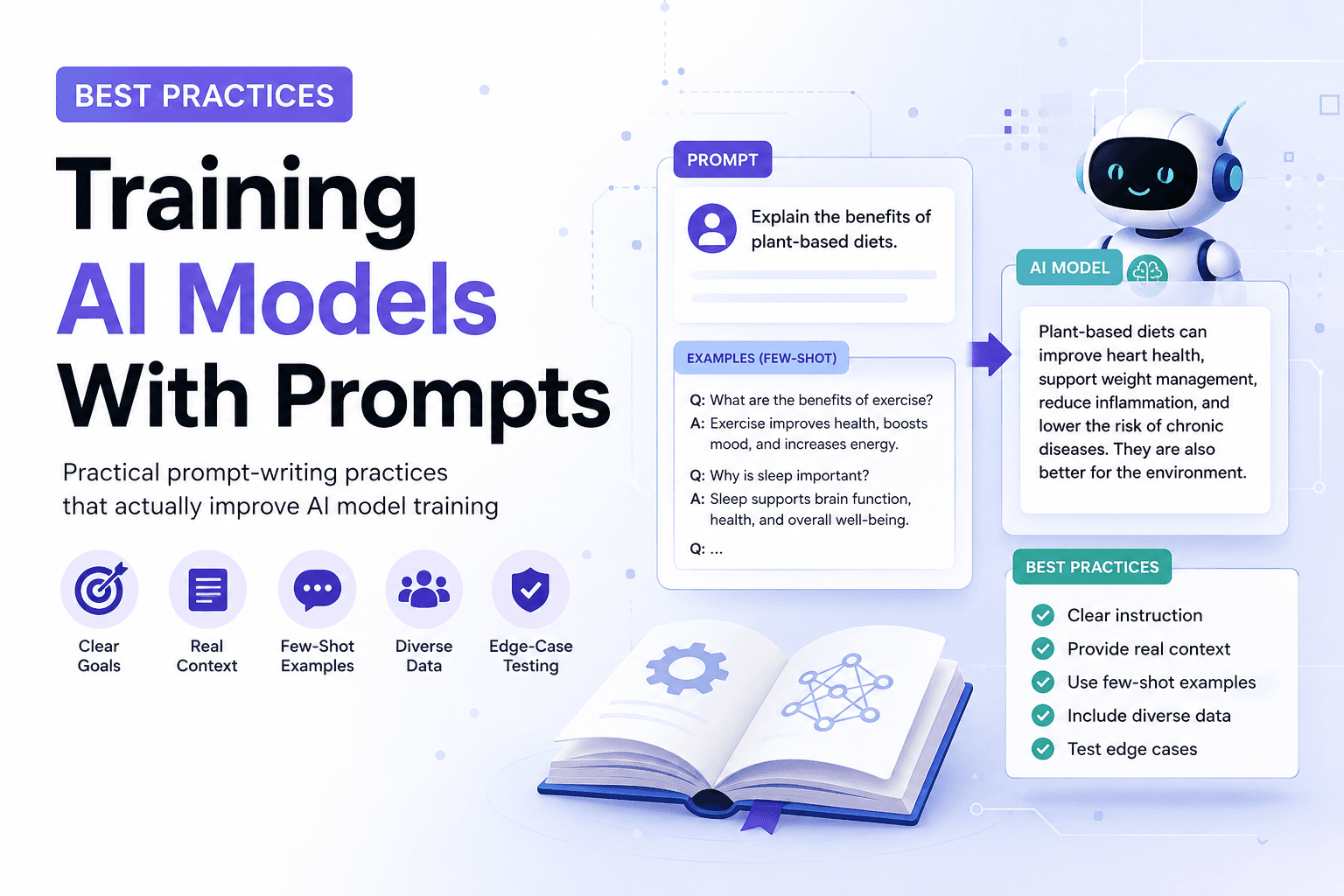
The most beneficial practices for training AI models with prompts are: setting a clear goal before writing the prompt, providing real context instead of bare instructions, using few-shot examples, diversifying prompt phrasing while keeping the format consistent, testing edge cases, iterating based on real outputs, avoiding prompt overload, and documenting what works and what doesn't.
Note: "training" here covers two related but different things — prompt engineering (crafting prompts to guide an existing model's behavior at inference time) and fine-tuning (using prompt-response pairs as training data to actually update the model's weights). A third approach, RLHF (reinforcement learning from human feedback), trains a model using human rankings of its outputs rather than prompts alone. Most of the practices below apply to both prompt engineering and fine-tuning, but a few — like data diversity and edge-case coverage — matter more for fine-tuning specifically.
So what actually works? Below is a rundown of the practices that make the biggest difference when you're using prompts to train, guide, or fine-tune an AI model — whether you're a hobbyist experimenting on weekends or a team building a production system. Each practice includes a side-by-side look at what a weak version looks like next to a stronger one, so you're not just reading advice in the abstract.
Start With a Clear Goal, Not a Clever Sentence
A lot of people treat prompt writing like writing a clever tweet — something punchy that sounds smart. That's the wrong instinct. Before you write a single word, ask yourself: what specific outcome do I want from this model?
Vague goals produce vague prompts, and vague prompts produce inconsistent training data.
✗ Make the bot smart and helpful.

✓ Answer billing questions in under three sentences, in a friendly
  tone, without making promises about refunds.
The first version gives the model nothing to aim at — "smart" isn't a behavior, it's a feeling. The second defines length, tone, and a hard boundary all in one line. Write the goal down first, in words this specific, before you touch the actual prompt.
Give the Model Context, Not Just Instructions
One of the most common mistakes in prompt-based training is assuming the model knows what you know. It doesn't. If you're training a model to summarize legal contracts, don't just say "summarize this." Tell it who the summary is for, what level of detail matters, and what to leave out.
✗ Summarize this contract.

✓ Summarize this contract for a small business owner with no legal
  background. Flag any clause involving penalties or auto-renewal.
  Skip boilerplate language. Keep the summary under 150 words.
A stronger prompt structure generally has five parts:
- Role — who the model is acting as
- Task — what it needs to do
- Context — background information it needs to know
- Constraints — length, tone, format, things to avoid
- Example — a sample of the kind of output you want
Models trained or fine-tuned on prompts that include real context consistently produce more reliable, on-target outputs than ones trained on bare instructions.
Use Few-Shot Examples Whenever Possible
Telling a model what to do is helpful. Showing it is more effective. This is the idea behind few-shot prompting — also called in-context learning — including two or three examples of the input-output pairs you want the model to learn from, right inside the prompt itself.
✗ Rewrite customer complaints so they sound professional.

✓ Rewrite each complaint to sound calm and professional, the way
  shown below.

  Input: "This is the third time my order is late and nobody's
  telling me anything!!"
  Output: "This is the third delay on my order, and I haven't
  received any updates. Could you share what's causing it?"

  Input: [new complaint goes here]
  Output:
The first prompt describes a tone. The second demonstrates it. The model picks up on the pattern — the tone shift, the sentence structure, the level of formality — far more reliably than it would from a description alone. This pattern is well-documented in Anthropic's prompt engineering guidance, which recommends starting with clear, direct instructions before layering in examples. The trade-off is length: few-shot prompts take up more space and, if you're using an API, more tokens. But for anything where consistency matters, the accuracy gain is usually worth it.
Keep Your Prompt Data Diverse — but Consistent in Format
If you're building out a set of training prompts, don't just write ten variations of the same sentence. Real users phrase things in messy, unpredictable ways, so your training prompts should reflect that variety.
✗ How do I reset my password?
  How can I reset my password?
  What's the way to reset my password?

✓ yo my password isnt working how do i fix this
  I forgot my password — what's the reset process?
  Password reset keeps failing, error code 403, any ideas?
The first set is the same sentence dressed up three ways — it teaches the model almost nothing new. The second covers different tones, different levels of technical detail, and even a specific error code. Vary the language freely. Just keep the underlying prompt format — where instructions go, how examples are labeled — steady across the set, or the model has a harder time learning what actually matters.
Test for Edge Cases, Not Just the Happy Path
It's tempting to stop once your prompts handle the obvious cases well. But the prompts that quietly wreck a model's reliability are the weird ones — empty inputs, contradictory instructions, questions the model shouldn't answer, or requests that fall just outside what you trained it for.
✗ Only testing: "How do I reset my password?" — then calling it done.

✓ Also testing:
  - An empty message
  - "Reset my password AND don't send me any emails about it"
  - "Reset my coworker's password for them"
  - A message written in a different language
A model that only performs well on clean, expected inputs isn't actually reliable — it just hasn't been stress-tested yet.
Iterate Based on Actual Outputs, Not Assumptions
This one gets skipped constantly. People write a prompt, glance at the first output, decide it looks fine, and move on. But a single good response doesn't mean the prompt is solid — it might mean you got lucky.
✗ Run the prompt once, read the output, ship it.

✓ Run the same prompt across 10-15 different inputs, then check:
  - Where does the model drift off-topic?
  - Where does the tone slip?
  - Where does it hedge when it should be direct, or vice versa?
Each answer is a signal to refine the prompt — tightening a constraint, adding an example, rewording an instruction that's being misread. Treat prompt design as a loop, not a one-time task.
Avoid Overloading a Single Prompt
There's a temptation to cram everything into one giant prompt — the role, five constraints, three examples, a tone guide, and a formatting spec, all in one block of text. Past a certain point, this backfires. Models can lose track of instructions buried in the middle of a long prompt, a pattern sometimes called the "lost in the middle" effect.
✗ One 400-word prompt asking the model to draft a product
  description, check it against five brand guidelines, adjust the
  tone three different ways, and format it for two platforms — all
  at once.

✓ Step 1: Draft a product description in a casual, upbeat tone.

  [separate follow-up]

  Step 2: Check this draft against these three brand guidelines:
  [list]. Flag anything that doesn't match.
Two focused prompts often outperform one overloaded one, because each step gets the model's full attention instead of splitting it five ways.
Document What Works — and What Doesn't
Finally, keep a record. When you find a prompt structure that reliably produces good results, save it. When one fails in a specific way, note why.
✗ Rewriting the same "good tone" prompt from scratch every few
  weeks because nobody remembers what worked last time.

✓ A shared doc with two columns — "Prompt pattern" and "Why it
  worked / why it failed" — updated every time someone finds
  something worth keeping.
This sounds obvious, but most people rediscover the same mistakes over and over because nothing was written down the first time. Over time, this becomes an internal playbook — a set of proven prompt patterns you can reuse instead of reinventing every time you start a new task or train a new model.
Frequently Asked Questions
What is few-shot prompting? Few-shot prompting means including a small number of example input-output pairs directly in a prompt so the model can infer the pattern you want, rather than relying on a written description alone.
How many examples should a few-shot prompt include? Two to five examples is typically enough. Beyond that, returns diminish and the prompt starts consuming tokens that could go toward context or constraints instead.
What is a negative prompt in AI? A negative prompt tells the model what to avoid — a tone, a topic, a format — rather than what to do. It's most common in image generation but applies to text prompts too.
Is prompt engineering the same as fine-tuning? No. Prompt engineering guides an existing model without changing it. Fine-tuning uses prompt-response data to actually retrain the model's weights.
The Bottom Line
Training an AI model with prompts isn't about finding one magic sentence that unlocks perfect results. It's a discipline built on clear goals, real context, good examples, honest testing, and a willingness to revise. The models are only as good as the prompts feeding them — treat prompt writing as a skill worth practicing, not an afterthought before you hit send.
Related
Resources
ChatGPT Professional Photo Prompt: 15 Studio-Quality Templates (2026)

AI Halloween Photo: Prompts That Actually Look Like You (2026)

AI Christmas Photo: The Viral Prompt + How to Actually Do It (2026)
AI Prompt for Instagram Post: Formula + Templates (2026)